- Rankings now slip in weeks, not quarters, making scheduled audits too slow to protect performance
- Content monitoring agents track traffic, CTR, and position changes continuously and surface pages that need attention
- Prioritization drives the real gains, separating revenue-critical pages from low-impact updates
- Human editors remain the gatekeepers for product, pricing, and other high-stakes content
- Some marketing teams already use AI agents — through AEO platforms like AirOps — to watch for content decay and kick off refresh workflows automatically.
Content decay moves faster than most teams can track. A page can slide from position three to position twelve in weeks, long before quarterly audits catch the drop.
Only 30% of brands stay visible from one AI-search run to the next, which means most teams lose exposure between answers, even when nothing on their site changes. In that environment, scheduled audits cannot protect performance.
AI agents for content monitoring change that reality. They help teams surface early signs of performance decay and prepare updates before authority erodes. This guide explains how content monitoring agents work, which patterns are worth automating, and how teams build or buy them today.
What are AI agents for content monitoring?
AI agents are autonomous software programs that monitor content performance, identify decay signals, and prepare refresh actions with minimal human input.
Agents connect to sources like Google Analytics and Search Console, interpret trends, and decide what to do next based on goals you define.
A traditional audit tool flags declining pages and hands you a spreadsheet. An agent identifies the pages that lost traction, determines why, drafts updates, and routes them for approval.
One stops at reporting. The other finishes the job. Content decay detection becomes continuous rather than periodic, and agents flag declining pages before rankings slip beyond recovery.
How AI agents automate content monitoring and refresh
In practice, content monitoring agents move through four repeatable stages.
Performance signal detection
Agents connect to analytics and search data through APIs. They track ranking shifts, traffic trends, engagement drops, and click-through rate changes.
When a page crosses a threshold you set, the agent flags it automatically.
Content analysis and prioritization
Not every drop deserves the same response. Agents score pages by business impact, update difficulty, and opportunity size.
A revenue-driving product page that slips from position three to eight outranks a blog post that never generated demand. AI content optimization tools automate this scoring, combining traffic data, citation performance, and keyword rankings into a single priority queue.
Automated refresh execution
Once an agent selects a page, it drafts suggested content refresh updates. That might include:
Refreshing outdated statistics
Adding missing sections
Improving metadata
Rewriting stale paragraphs
The agent pulls from your brand knowledge base to keep tone consistent.
Many teams manage this through a central system that combines performance signals with refresh tasks in one place. For example, AirOps lets content teams surface declining pages, generate draft updates, and keep every change grounded in first-party knowledge and brand rules rather than scattered across tools. In mature workflows, editors often review and publish these updates the same day signals appear.

Quality verification and publishing
Before publishing, agents run checks such as:
Brand voice verification: Confirms tone and terminology match your style guide
Factual accuracy scans: Flags claims that may be outdated or unverifiable
Readability scoring: Checks that content remains accessible to your target audience
AI agents vs traditional content audit tools
You might wonder what separates AI agents from the spreadsheet-based audits you already run. The differences show up in how work moves from detection to action.
Two differences tend to matter most in practice.
Full-cycle execution shifts refresh from a reporting exercise into an operational workflow. Spreadsheets end with a list of problems. Agents end with a ready-to-review update that fits your publishing process.
Benefits of content monitoring AI agents
Teams adopting agent-based workflows typically see improvements across several areas:
Less time spent on manual audits
Faster recovery for declining pages
Better refresh prioritization
More consistent brand voice at scale
Stronger AI citation rates from improved content freshness. Unrefreshed pages that go stale are more than twice as unlikely to earn citations as regularly updated content.
Fewer broken links and outdated references across your content library
AI agent workflows for content refresh
Different content challenges call for different agent configurations. Here are five workflows worth considering.
1. Automated performance decline detection
Define triggers such as ranking drops, traffic losses, or engagement dips. When a page crosses the line, the agent creates a refresh task. This is automated content monitoring at work, catching content decay before rankings fall.
2. Competitive content gap monitoring
Agents track competitor pages targeting shared keywords through continuous competitive monitoring.
When rivals publish stronger material, your agent flags the opportunity and drafts counter-updates.
3. Fact-checking and accuracy updates
Statistics age fast. More than 70% of pages cited by AI were updated in the past twelve months, making a one-year refresh baseline the minimum standard for staying visible.
Agents verify dates, numbers, and claims against trusted sources and flag outdated information before it hurts credibility. AI agents for SEO treat freshness as the highest-priority signal. As growth advisor Kevin Indig notes in a recent session, freshness and structure rank as the top two drivers of AI citations. These automated content audits also catch broken links and outdated references before they compound.
4. SEO signal-based refresh triggering
Click-through rate drops often signal stale titles or meta descriptions. Agents detect those patterns and generate new options for testing. Built into a content refresh workflow, these agents can monitor and trigger updates the moment click-through rate slips.
5. Multi-page content synchronization
When product features or pricing change, agents propagate updates across related pages to keep your site consistent.
How agents confirm a content refresh worked
A content refresh only counts once the update is live, indexed, and earning attention again. Content monitoring agents close that loop by checking each change before they mark it complete, rather than stopping at the draft.
Request reindexing through Search Console so the updated page gets recrawled quickly.
Recheck internal and external links, then repair any that broke since the last update.
Confirm headings and structured data still follow a clean, sequential order that AI engines can parse.
Compare the new draft against brand voice and factual sources one final time.
Watch citation and ranking recovery over 30, 60, and 90 days to confirm the refresh landed.
This post-publish check is where many manual audits fall short. Agents run it every time, which turns a single fix into a repeatable content refresh workflow that protects rankings as answer engines shift.
How to set refresh cadences by content type
Not every page needs the same update frequency. Setting refresh cadences by content type prevents wasted effort on low-impact pages while protecting high-value assets from decay.
Oyster HR applies this model across their content library and has seen 25 to 30% uplift in rankings and citations from systematic refresh workflows. The four-month content plateau window they identified sets a natural trigger point for blog content specifically.
How to score and prioritize pages for refresh
Agents score each page across four dimensions to determine refresh priority. Pages with the highest combined score move to the top of the queue.
Business impact: revenue attribution, conversion rate, pipeline influence
Performance trend: ranking trajectory, traffic change over 30/60/90 days, citation rate movement
Content freshness: days since last meaningful update, percentage of statistics older than 12 months
Competitive pressure: number of competitor pages updated in the past 90 days targeting the same keyword
Properly structured content earns a 2.8x citation lift in AI search results. A scoring model that factors structure alongside performance data routes agent effort toward pages with the highest recovery potential.
Libraries teams use to build content monitoring agents
For teams building custom agents, several libraries form the foundation.
LangChain and LangGraph for multi-agent systems
Use them to coordinate multiple agents that handle different responsibilities. One agent can track performance signals while another prepares content updates.
Model APIs
Most teams connect to leading model APIs such as OpenAI, Anthropic, or other providers, depending on data, cost, and compliance needs. These APIs handle content analysis and draft generation while your system enforces brand rules and review steps.
BeautifulSoup and Scrapy for content crawling
Before an agent can analyze a page, it must extract and structure the HTML. BeautifulSoup and Scrapy extract and clean page HTML so agents can analyze real content.
Other commonly used libraries
Requests for fetching API data and pages
Selenium for JavaScript-rendered content
spaCy for language analysis
Pandas for detecting performance patterns in analytics exports
Best practices for content monitoring AI agents
Strong results come from how you set these systems up, not from how many automations you run.
1. Define clear monitoring triggers and thresholds
Agents need specific instructions, not vague goals. If you tell a system to "watch for decline," you force it to guess what decline means.
Instead, define triggers in plain terms your team already uses, such as:
Refresh when organic traffic drops 20% month over month
Flag pages that fall more than three positions for a primary keyword
Trigger a metadata rewrite when the click-through rate drops below a set baseline
These rules let agents act consistently and give teams predictable outcomes. Oyster HR found that content typically plateaus around four months after publication, making that window a reliable trigger for automated monitoring.
2. Connect your SEO and analytics stack
Content monitoring only works when agents see the full picture. Connect Search Console, your analytics platform, and your CMS so agents can trace performance changes back to real page elements. Connected data is what separates AI agents for SEO from simple alerting tools.
Tools like AirOps bring those data sources together into a single operating system, allowing teams to see how content performs across SEO and AI search, then act on that insight immediately instead of exporting reports or stitching together dashboards.

Teams often underestimate the work required to clean up analytics permissions and API access before agents can see the full picture.
3. Build human review into the system
Autonomy does not mean hands-off. Decide where your team wants control.
Most teams allow agents to publish low-risk updates, such as:
Title and description tests
Internal link improvements
Minor formatting changes
They route high-impact pages like product, pricing, or legal content to editors before anything goes live.
4. Maintain brand voice guidance for every update
Content monitoring agents do not succeed on instructions alone. They need the same context your editors rely on when deciding how to phrase, structure, and frame information. That includes approved product terms, forbidden phrases, tone examples, formatting rules, product context, and examples of past high-performing pages. Standalone content monitoring software often lacks this brand context, which is why integrated platforms outperform point solutions for refresh workflows.
Without that foundation, automated refreshes drift toward generic phrasing and lose the clarity that drives visibility in AI search. As Alex Halliday, CEO of AirOps, and Ethan Smith, CEO of Graphite, note, strong brand guidance plays a direct role in earning citations.
"What you're really doing is trying to make sure your content is prepared for citation. You want to become the answer the models cite." — Alex Halliday
That mindset reframes refresh work as a core visibility strategy.
5. Start with one content category
Avoid rolling agents across your entire site on day one. Pick a category that feels safe to test, usually blog content or resource pages.
Once you trust the outputs and review flow, expand into higher-stakes sections like product documentation or pricing. This staged rollout builds confidence across your team and avoids unnecessary risk.
Many teams begin by selecting twenty to thirty high-value blog posts, setting basic decline thresholds, and routing all updates to a single editor. This creates a controlled environment to tune triggers, review rules, and brand guidance before expanding further.
How to measure content monitoring AI agent success
Track these metrics to evaluate whether agents protect performance and save time. Together, they show whether your AI content optimization is compounding or stalling.
Traffic and ranking recovery: Compare refreshed pages against their pre-update baselines. Look for faster ranking rebounds and smaller drops when pages lose position.
Refresh frequency and content freshness: Agents should increase how often pages get touched, not just how many alerts you receive. Track how many pages get updated each month and how long core pages go without meaningful changes.
Time saved versus manual audits: Estimate how many hours your team spent reviewing spreadsheets, exporting reports, and triaging declines before agents. Then compare that to how long it now takes to review and approve updates.
Readability and brand consistency: Use readability tools and brand checks to confirm that automated refreshes still sound like your team. If quality dips, the system needs better guidance.
Many teams struggle to turn these metrics into action because performance data lives in too many places. With AirOps Insights, marketers can track changes in rankings, AI search visibility, and citation performance in one view, making it easier to spot decay early and trigger refresh work before performance slips.
Pages that regain citation momentum after a refresh resurface in 40% of tracked AI answers. Content optimization through AI-driven measurement closes the loop between signal detection and visible recovery.
What comes next for content monitoring agents
Over the next year, content monitoring agents will move beyond reactive updates. Approximately 85% of brand mentions in AI search now originate from third-party pages rather than owned domains, which means visibility no longer lives only on your site.
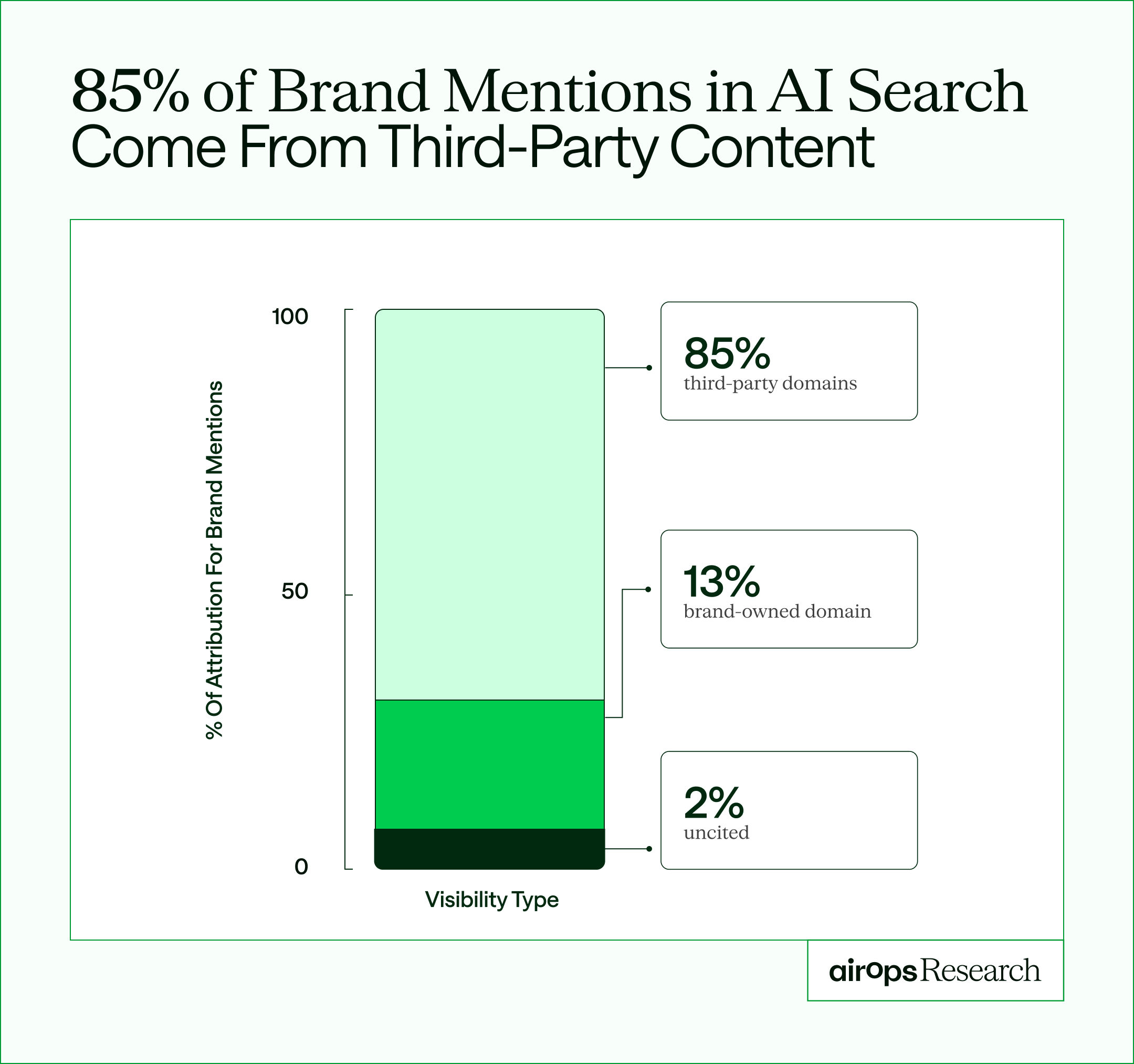
AirOps 2026 State of AI Search Report
That shift forces agents to monitor not just your pages, but how your brand appears across communities, reviews, and partner content.
Predictive decay detection: Agents will spot patterns that signal future decline before rankings fall.
Cross-channel synchronization: When core information changes, updates will flow automatically across webpages, email templates, and social copy so your message stays consistent everywhere.
Answer engine monitoring: Agents will begin tracking how your pages appear inside AI search experiences, not just traditional rankings, helping teams protect visibility in answer engines as well as SERPs.
Key takeaways
AI-search volatility has made manual content audits structurally unreliable.
Refresh cadence matters more than volume. Pages cited by AI tend to receive meaningful updates within the past twelve months, often much sooner.
Effective monitoring systems prioritize revenue-critical pages first rather than treating every decline equally.
Brand guidance, structure, and clarity determine whether refreshed pages become sources AI models cite or ignore.
Visibility increasingly depends on off-site signals, which means monitoring must extend beyond your own domain.
From maintenance tasks to growth systems
Content monitoring no longer needs to live in spreadsheets and quarterly audits. AI agents turn refresh into a continuous system that protects rankings, surfaces the right pages to update, and prepares improvements before performance slips.
AirOps acts as a content engineering system that connects performance insights with refresh actions. It applies brand governance to every update, and gives teams a clear loop from monitoring to execution to measurement — all in one operating layer built for the AI era. Descript used this approach to refresh 600+ blog posts and 400+ tools pages, driving 35% organic traffic growth with 9x faster refresh cycles.
Book a demo to see how AirOps helps teams keep content fresh, accurate, and visible in AI search at scale.
Frequently Asked Questions
How much does it cost to implement AI content monitoring agents?
Implementation costs vary widely based on approach—building custom agents with libraries like LangChain typically requires developer time and API costs ranging from hundreds to thousands monthly, while platform solutions like AirOps offer predictable subscription pricing that bundles monitoring, refresh workflows, and brand governance together.
Can AI content monitoring agents work with WordPress and other CMS platforms?
Most content monitoring agents integrate with popular CMS platforms through APIs or direct connections, allowing them to pull page data, track performance metrics, and push approved updates back to WordPress, Webflow, HubSpot, and similar systems without manual export-import cycles.
How do you prevent AI agents from making content changes that hurt SEO?
Effective safeguards include setting approval gates for high-stakes pages, defining strict brand voice rules in your knowledge base, running automated quality checks before publishing, and starting with low-risk content categories to validate outputs before expanding agent permissions.
How often should you refresh content for AI visibility?
Set a baseline refresh cadence of every twelve months for all indexed pages. High-traffic cornerstone content and AI content management hubs need quarterly reviews. Blog posts in competitive categories perform best with updates every 90 to 120 days. Growth advisor Kevin Indig identifies the twelve-month threshold as a no-regret starting point for any page targeting AI citations.
Can I use agents to monitor and trigger AI refresh workflows?
Yes. Content monitoring agents watch performance signals continuously and trigger refresh workflows the moment a page crosses a threshold you set. AirOps runs these Playbooks end to end, surfacing declining pages, drafting updates, and routing them for approval so your team acts before rankings slip.
How do I connect AI search monitoring to our CMS for automated reporting?
Connect your analytics, Search Console, and CMS through APIs so monitoring data and page elements stay linked. AirOps brings these sources into one operating system, then reports ranking, citation, and AI search changes automatically instead of forcing manual exports.
Which AI tools are best for automating content audits?
The best fit depends on how much you want to build. Developer teams assemble custom agents with libraries like LangChain, standalone monitors flag score drops, and integrated platforms like AirOps combine automated content audits, refresh drafting, and brand governance in one system.
How does automated content monitoring work?
Automated content monitoring works by connecting agents to analytics and search data, then watching for decay signals like ranking drops, traffic loss, and falling citation rates. When a page crosses a threshold you set, content monitoring agents flag it and can trigger a refresh before content decay compounds.
Get the latest on AI content & marketing
