How Parallel Uses Their Own Web Intelligence APIs Inside Quill to Grow AI Citations 130%

- Parallel's APIs power steps in AirOps Playbooks for blog creation, refresh, and research, and they use those same templates to create their own content
- One-week deployment: first Quill use case went from kickoff to 14 live articles in five days
- +130% citation rate lift and +165% more citations in AI search engines within 13 days of publishing, measured across ChatGPT, Gemini, Perplexity, and Google AI Mode
- Consolidated standalone analytics tools into AirOps, combining tracking and content creation in one platform
Meet Parallel, the web infrastructure leader for AI products
Parallel builds search and research APIs that give AI agents access to the live web. Developers use Parallel to add web search, data extraction, deep research, and continuous monitoring to their AI products, getting back structured, citation-ready results instead of raw HTML.
Parallel's buyers are developers, CTOs, and AI engineers, and increasingly, those buyers discover tools through AI agents rather than traditional search. Being cited in AI-generated answers is becoming a direct path to pipeline, which means content is a powerful growth channel for Parallel.
"AIs will soon use the web more than humans to research, discover, and make purchasing decisions," said Travers Nisbet, Parallel's co-founder. "AirOps is helping Parallel ensure our brand is visible to them."
Earning those citations requires content that's thorough, accurate, and fresh. Stale pages lose them and thin content never earns them. When Lukas Levert joined as Parallel's first marketer in September 2025, he started using AirOps to handle research and first drafts while he added brand perspective and technical nuance.
How Parallel runs their content pipeline with Quill, using their own API as part of the infrastructure
Quill is AirOps' marketing agent. It runs Playbooks autonomously for content creation, content refresh, and brand monitoring, and knows when to act on its own and when to pause for human input. Levert and his team spent a week building their first Playbooks from scratch, defining research steps, review checkpoints, and publishing criteria. By Friday they had articles live on the website.
Parallel isn't just using Quill. Their APIs are integrated directly into the Playbooks, making them both the customer and the infrastructure powering the content. Parallel's Search and Extract APIs source citations during drafting, the Search API fact-checks against the live web before publish, the Monitor API triggers content refreshes when competitive changes are detected, and the Task API powers deep research.
One step in Parallel's blog creation Playbooks uses their own Search API to source-check every article:
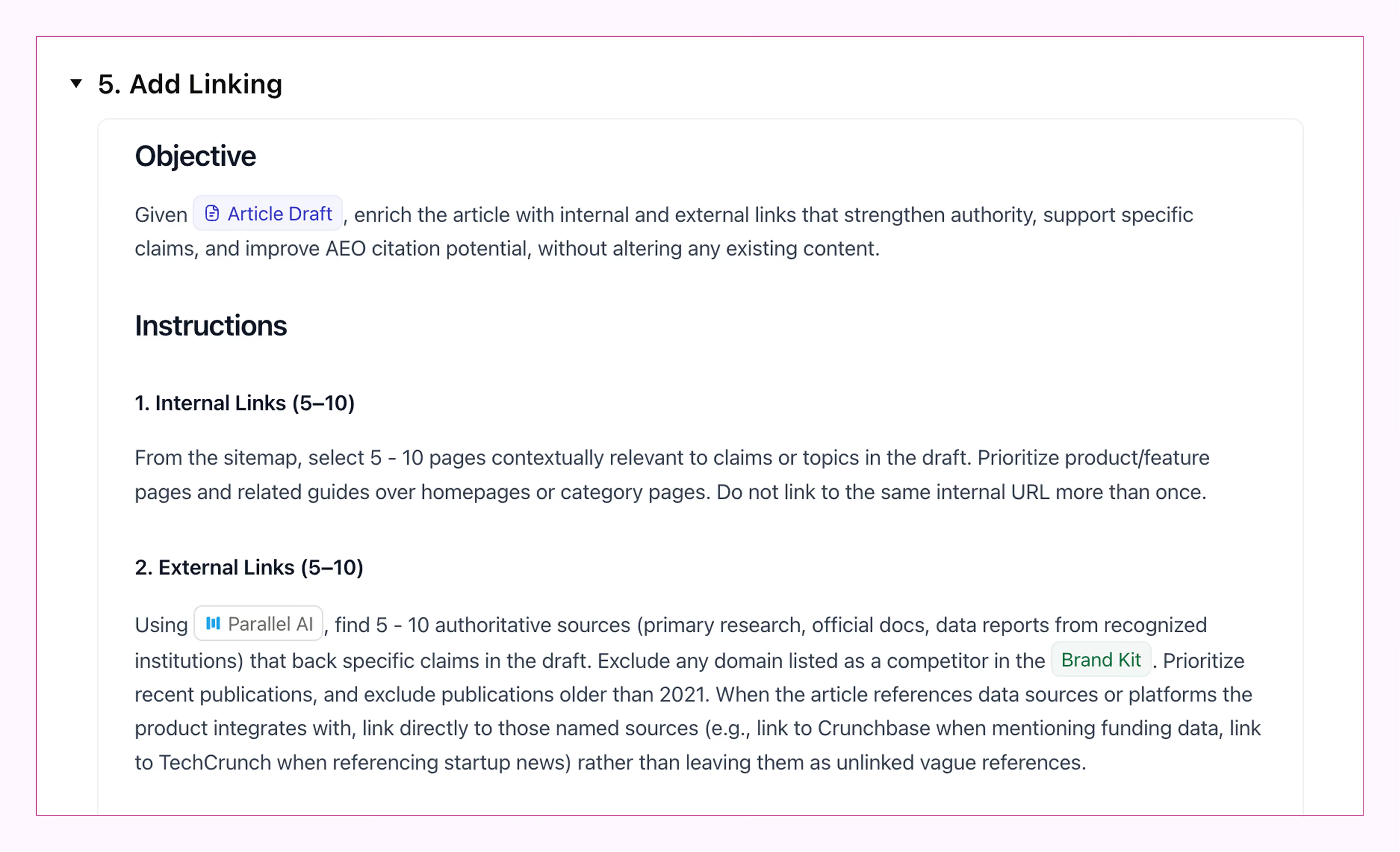
Quill executes that step against Parallel's Search API, pulls back ranked, citation-ready results in seconds, then composes them with the brand's voice, internal expertise, and proprietary context from the Brand Kit.
"Parallel is extremely good at deep research," Levert said. "The fact that we used Quill to write Playbooks that use the same APIs we sell to customers is the best proof of that."
Quill knows when to act on its own and when to pause: Levert reviews and approves before anything publishes, keeping the team in control of what goes live. Every article ships deeply sourced and on-brand, grounded in authoritative sources using Parallel's own infrastructure.
Parallel is available as a built-in tool in Playbooks, including in templates:
Anyone on AirOps can use Parallel's web data infrastructure in their Playbooks, and Parallel's own marketing team runs those same Playbooks to create their content. Learn more about how Playbooks can help you drive growth and win AI Search.
The results: measurable lift in visibility within days
AirOps tracks content performance across AI search engines with AEO analytics, measuring how often a brand gets cited in ChatGPT, Gemini, Perplexity, and Google AI Mode. For Parallel, AirOps tracked 150 prompts across a 13-day window before and after their first 14 Quill articles went live.
The results:
- +130% citation rate from 7% to 18% of tracked AI search responses now cite Parallel, with lift visible by day 2 after publishing
- +165% citation count, from 535 to 1,420 brand citations across the same prompt set
- +42% share of voice in Parallel's competitive category
- 25 prompts unlocked: 17% of the tracked prompt set went from zero brand presence to actively citing Parallel
- 83% of tracked prompts: saw a meaningful change in citation rate
Those 14 articles in the initial sprint accounted for 97.4% of all brand citations in the after window, driving nearly all of Parallel's AI search visibility.
"We use AirOps to track our share of voice in LLMs and see how we stack up against competitors," Levert said. "When we compared it to Ahrefs, AirOps was way more cost effective for the same insight." They consolidated their standalone analytics tools into a platform that tracks and creates.
What's next
Parallel's Monitor API can already trigger Quill Playbooks based on competitive signals, and the team is expanding into deeper technical content. As Parallel grows its marketing team, Quill gives new hires a way to produce content that meets Levert's standards from day one. The Playbooks encode the strategy, and Quill handles execution.
Parallel's web data infrastructure makes Quill better. Quill helps Parallel show up where it matters. The Playbooks are live, and anyone can start building with them today.
Ready for an AI agent that actually moves your metrics? Meet Quill.
Get the latest on AI content & marketing
