- Repurposing systems convert long-form assets into social posts, email copy, short videos, and blog derivatives automatically
- Teams replace manual rewriting with structured review steps that keep voice and messaging consistent
- Evergreen blogs, webinars, podcasts, and research reports deliver the highest return as source material
- Most teams launch with one high-volume content type, then expand after refining prompts and templates
You published a strong piece of content. It performed well. Then it faded into your archive while you rushed to the next deadline. Nearly half of B2B marketers say this pattern blocks their ability to scale content.
AI workflows for content repurposing fix that problem. One asset no longer lives in one place. A single blog post, webinar, or report can power dozens of pieces across social, email, video, and search.
This guide explains how content repurposing works in practice, which formats scale best, and how to build your first system without adding chaos to your process.
What is an AI content repurposing workflow?
An AI content repurposing workflow turns one source asset into multiple channel-ready formats. You start with a blog post, video, or podcast episode. The system produces social posts, email blurbs, short video scripts, and more.
Instead of rewriting everything by hand, AI handles the transformation while you stay in control of review and publishing.
Every repurposing system includes four building blocks:
Source content input: Your original asset, such as a long-form article, webinar, or research report
AI transformation engine: The tool that analyzes and restructures your content
Output templates: Prebuilt formats for LinkedIn, email, YouTube, and other channels
Automation rules: Triggers and schedules that run when new content goes live
These four building blocks form the foundation of every high-quality AI content workflow. Teams that define each one before scaling avoid the most common repurposing failures.
Why AI workflows multiply your content ROI
You already invested heavily in creating strong content. Repurposing extracts more value from that work without stretching your team thinner.
Expand reach across channels
One blog post can become a LinkedIn carousel, three X posts, an email section, and a short video script. Each channel attracts a different audience. Many podcast listeners never read your blog. Repurposing meets them where they already spend time.
Reduce production time
Original content creation demands research, editing, and review. AI content automation skips the blank-page problem. Teams that repurpose consistently save hours every week while increasing publishing volume, especially when they stop relying on brittle manual processes that introduce errors and slow everything down.
Keep brand voice consistent
When teammates adapt content manually, tone drifts. AI workflows apply the same voice and messaging rules from your brand kit across every output. Consistency strengthens recognition no matter where people encounter your content.
In AirOps analysis, brands that refreshed and redistributed content every 90 days earned up to 4.8× more AI citations than competitors who published once and moved on.
Oyster HR saw similar gains. After building content refresh workflows in AirOps, their team measured a 25-30% uptick in rankings and citations for refreshed articles compared to pages left untouched.
How AI content repurposing workflows work
Here's what happens inside a repurposing system.
1. Select your source content
Choose assets with depth. Long-form blogs, webinars, podcasts, and whitepapers work best because they contain multiple angles worth sharing. Favor evergreen topics that stay relevant over time.
2. Configure transformation rules
Set tone, length, and channel requirements.
For example, you might tell the system:
LinkedIn posts should sound professional and insight-led
Instagram captions should feel lighter and more conversational
Email summaries should include a clear takeaway and link
These rules keep every output aligned with your brand without re-explaining expectations each time.
Structure matters beyond readability. Pages with properly structured headings and formatting earn 2.8x more AI citations than unstructured equivalents. Your transformation rules should enforce clear heading hierarchy and scannable layouts in every output format.
3. Generate multi-format outputs
From one blog post, you might create:
LinkedIn posts highlighting key insights
An X thread breaking down the main argument
An email newsletter summary
Instagram carousel slides with visual quotes
A YouTube script for a short recap video
4. Review and publish
Human review remains essential. Most teams add an approval step before publishing. Lower-risk content can auto-publish on a schedule. Higher-stakes pieces still go through manual sign-off. That review step matters: pages not updated quarterly are three times more likely to lose AI citations than recently refreshed pages.
A strong content refresh workflow follows the same review-then-publish pattern. Flag underperforming pages, run them through your AI transformation rules, verify accuracy, and republish on a fixed schedule. Teams that treat refresh as a standing system maintain consistent AI visibility across their content library.

AirOps 2026 State of AI Search
5 AI workflow types to repurpose content
Different content types call for different repurposing approaches. Here are the most common patterns teams use.
Blog posts to social media
AI extracts key points, statistics, and quotable insights using targeted repurposing prompts, then reformats them for each social platform. A 2,000-word blog post might yield a week's worth of social content across three or four channels.
To repurpose blog content into social snippets, configure a workflow that extracts the top three claims from each post, reformats each as a standalone update, and applies platform-specific length and tone rules. The system handles the transformation while you select which insights deserve amplification.
Long-form assets to blog series
Ebooks, whitepapers, and comprehensive guides often contain enough material for multiple standalone blog posts. AI identifies natural chapter breaks or subtopics and creates individual articles from each section. This approach also helps with SEO by targeting specific keywords with focused content.
Video to multi-channel content
Video repurposing starts with transcript extraction. From there, AI can generate blog posts summarizing the video, social clips highlighting key moments, audiograms for podcast platforms, and quote graphics for visual channels. A single 30-minute video can fuel content for weeks.
Podcasts to written content
Audio content translates well to written formats. AI transcribes episodes and restructures the content into show notes, blog recaps, social quotes, and email newsletters. This approach makes your podcast content accessible to audiences who prefer reading over listening.
Webinars to evergreen resources
Live webinars have a short moment in the spotlight, but the ideas inside them stay useful long after the event ends. Repurposing turns recordings into blog posts, FAQ pages, social snippets, and email sequences that keep answering real buyer questions.
That shift matters because AI models favor clear, well-structured reference material over one-time campaigns. Blog posts losing organic traffic to AI Overviews can also be repurposed as video. As Steve Toth observed, videos now rank more prominently in AI search results than the text-based content they summarize.
As Alex Halliday, CEO of AirOps, explained in a recent webinar,
"What you're really doing is trying to make sure your content is prepared for citation, and you really want to become the answer that the models cite."
Some teams use AirOps to orchestrate this step inside a single system. They pull a webinar transcript into AirOps, apply brand-aware transformation rules, and generate channel-ready drafts for social, email, and video from a single source, eliminating the need to bounce between tools.
Top AI content repurposing tools for workflow automation
Several tools specialize in different aspects of content repurposing. Your choice depends on your primary content types and workflow requirements.
Repurpose.io
Repurpose.io focuses on video content and social automation. The tool automatically cross-posts between platforms like TikTok, YouTube, and Instagram, handling format adjustments for each channel.
Descript
Descript approaches video and podcast editing through transcripts. You edit the text, and the tool adjusts the audio or video accordingly. This makes repurposing audio and video content more intuitive for teams comfortable with text editing.
Canva
Canva's AI features turn text content into graphics, carousels, and presentations. The template library speeds up visual content creation for social channels.
AirOps
AirOps lets teams build custom AI workflows that connect brand knowledge with content repurposing logic.
How to build your first AI repurposing workflow
Getting started is simpler than you might expect. Follow these steps to create your first workflow.
1. Audit your existing content library
Review your current content assets and identify pieces worth repurposing. Look for high-performing content that still generates traffic or engagement, plus evergreen pieces that remain relevant regardless of when they were published.
A focused content repurposing strategy starts with clustering your existing assets by topic and format. Group related posts, webinars, and reports together so you can identify which clusters have the most reuse potential before building any workflows.
2. Define target formats and channels
Map out which formats you want to create and which platforms you publish on. List your source content types in rows and your target outputs in columns to identify which workflows to build first.
3. Select AI tools and integrations
Choose tools based on your content types and existing tech stack. Focus on how each tool connects with your CMS, social scheduling platform, and email marketing system.
4. Create reusable workflow templates
Build templates that run repeatedly for similar content types. In AirOps, teams create these as reusable systems that combine source inputs, brand context, and transformation logic, so every new asset moves through the same standards.
Reusable AI workflow templates eliminate setup time for recurring content types. Once your blog-to-social template works, duplicate it for webinar-to-email or report-to-carousel conversions.
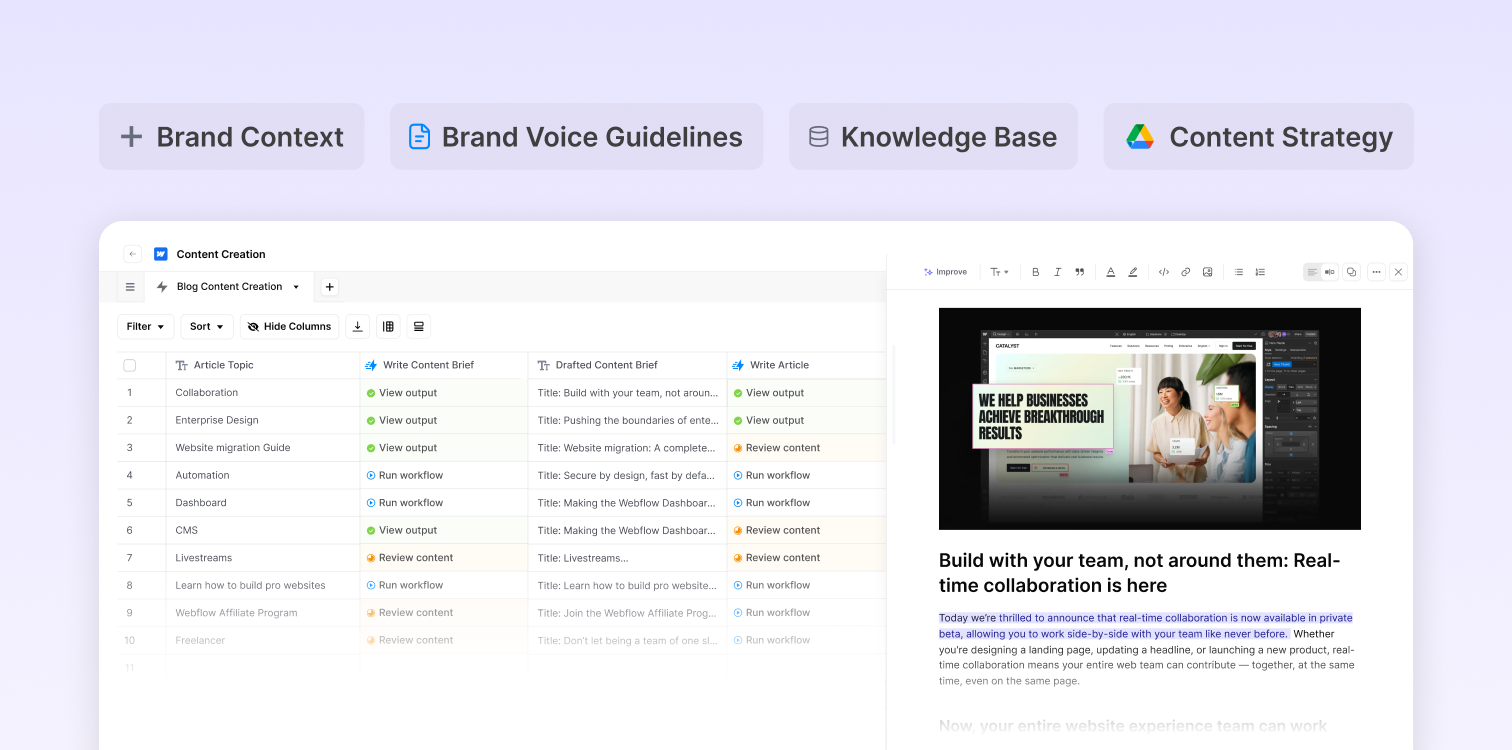
This approach mirrors how high-performing teams handle content refreshes inside AirOps — applying structured rules to update, redistribute, and monitor content across channels as part of an ongoing lifecycle rather than a one-off project.
Many teams treat this refresh loop as a standing system rather than a cleanup task, using AI-powered refresh workflows to keep high-value pages accurate and visible over time.
5. Test and refine output quality
Run test batches and evaluate the outputs carefully. Adjust prompts, rules, and templates based on what you learn.
Which content to repurpose first
Not all content deserves equal repurposing effort. Prioritize strategically based on performance and longevity.
High-performing evergreen content
Evergreen content addresses topics that stay relevant over time. Your best-performing evergreen pieces offer the highest repurposing ROI because they've already proven their value with your audience. Think foundational guides, how-to posts, and reference material.
Many teams track these evergreen refresh cycles directly inside AirOps. Using built-in performance insights, they can flag aging pages, push them back through repurposing templates, and redistribute updated versions across social, email, and AI search surfaces.

The strongest programs formalize this into dedicated content refresh workflows that run on a predictable cadence instead of waiting for traffic drops to trigger action.
Timing matters. Pages that go unrefreshed for more than 90 days are three times more likely to lose AI citations than recently updated content. Prioritize assets showing early signs of traffic decline before the decay compounds.
Data-rich research and reports
Original research, surveys, and reports make excellent repurposing sources. The data and insights within them can fuel dozens of derivative pieces, from social posts highlighting individual statistics to blog series exploring different findings.
Video and audio with reusable segments
Recorded content like webinars, podcasts, and interviews contain multiple clip-worthy segments where speakers share insights, tell stories, or explain concepts clearly. Each segment becomes its own piece of content.
Key takeaways
Repurposing systems turn blogs, webinars, and reports into consistent streams of social, email, and video content instead of one-off campaigns.
Clear transformation rules keep brand voice intact while reducing the time teams spend rewriting the same ideas.
Review and refresh cycles protect long-term visibility, with outdated pages far more likely to lose traction in AI search.
Evergreen and data-rich assets deliver the highest return when they feed structured repurposing templates.
Tools like AirOps help teams orchestrate these steps in a single system, replacing manual handoffs with repeatable processes.
How to measure AI content repurposing results
Repurposing workflows only justify their cost when you can prove they drive results. Track these metrics across your source and derivative content to measure impact.
Reach multiplier: Total impressions across all derivative pieces divided by source content impressions. A strong repurposing system should deliver 3-5x reach from a single source asset.
Production velocity: Time from source publication to all derivative pieces going live. AI workflows should compress a week of manual adaptation into a single afternoon.
AI citation rate: Percentage of tracked prompts where your repurposed content earns citations. Pages with structured formatting consistently outperform unstructured equivalents.
Engagement per derivative: Clicks, shares, or conversions on each repurposed piece compared to the source. Use this data to guide where you invest next.
Brand voice consistency score: Percentage of derivative pieces that pass editorial review without revision. A well-configured Brand Kit reduces this friction over time.
Compare original content performance against AI-adapted versions on the same channel. If derivative pieces consistently underperform, revisit your transformation rules rather than creating more volume.
Common mistakes in AI content repurposing
Scaling repurposing too fast creates problems that offset the efficiency gains. Avoid these patterns.
Publishing without human review. AI-generated derivatives need editorial review before going live. Skipping this step introduces factual errors, tone drift, and formatting issues that damage credibility.
Repurposing weak source material. AI amplifies whatever you feed it. A thin blog post produces thin social posts. Start with assets that contain original insights, data, or expert perspectives.
Treating every platform the same. A LinkedIn post and an Instagram caption serve different audiences with different expectations. Configure distinct transformation rules for each channel rather than adjusting length alone.
Skipping brand context. As Jordan Miller from AirOps explained in a recent session, "A lot of the principles that apply to training a human apply to training the AI. You still have tone of voice requirements, you need templates and examples and source content." Workflows without brand context produce generic output.
Measuring output volume instead of outcomes. Publishing 50 derivative pieces means nothing if they generate zero engagement. Track reach, clicks, and AI citations per derivative rather than counting posts.
Build systems that multiply your best ideas
High-performing teams treat repurposing as an operating system, not a side project. Over time, that system turns into a repeatable engine that transforms blogs, webinars, and reports into steady streams of social, email, and video content.
AirOps gives teams a shared system for turning source content into a continuous stream of channel-ready assets. By combining performance insights, brand governance, and reusable AI systems in one platform, repurposing becomes part of everyday content operations rather than a side project. AirOps is the partner brands bring in for this shift, the platform, the media mix, and the team together, not just software to log into.
Book a demo to see how AirOps helps teams turn one asset into dozens of channel-ready pieces every week.
How long does it take to set up an AI content repurposing workflow from scratch?
Most teams can launch a basic repurposing workflow within one to two weeks, starting with a single content type like blog-to-social conversion. The initial setup involves configuring transformation rules and testing outputs, with refinement happening over the following weeks as you learn what works for your brand voice.
Can AI repurposing workflows maintain different brand voices for multiple clients or products?
Yes, modern AI workflow tools allow you to create separate brand profiles with distinct tone guidelines, terminology preferences, and messaging frameworks. Each workflow can pull from the appropriate brand knowledge base, making it practical for agencies managing multiple clients or companies with diverse product lines.
What's the typical cost savings of AI content repurposing compared to manual methods?
Teams typically report 60-80% time savings on derivative content creation, translating to significant labor cost reductions. A single content marketer using repurposing workflows can often match the output of a three-person team doing manual adaptation work.
How do you prevent AI-repurposed content from sounding repetitive across channels?
The key is configuring distinct transformation rules for each platform that go beyond length adjustments. Effective workflows vary sentence structure, emphasize different angles of the source material, and adapt the hook style to match how audiences engage on each specific channel.
Frequently Asked Questions
How long does it take to set up an AI content repurposing workflow from scratch?
Most teams can launch a basic repurposing workflow within one to two weeks, starting with a single content type like blog-to-social conversion. The initial setup involves configuring transformation rules and testing outputs, with refinement happening over the following weeks as you learn what works for your brand voice.
Can AI repurposing workflows maintain different brand voices for multiple clients or products?
Yes, modern AI workflow tools allow you to create separate brand profiles with distinct tone guidelines, terminology preferences, and messaging frameworks. Each workflow can pull from the appropriate brand knowledge base, making it practical for agencies managing multiple clients or companies with diverse product lines.
What's the typical cost savings of AI content repurposing compared to manual methods?
Teams typically report 60-80% time savings on derivative content creation, translating to significant labor cost reductions. A single content marketer using repurposing workflows can often match the output of a three-person team doing manual adaptation work.
How do you prevent AI-repurposed content from sounding repetitive across channels?
The key is configuring distinct transformation rules for each platform that go beyond length adjustments. Effective workflows vary sentence structure, emphasize different angles of the source material, and adapt the hook style to match how audiences engage on each specific channel.
Get the latest on AI content & marketing
