- Pages that mirror real user questions show up more often in AI answers
- Sections that open with a direct response get pulled before long explanations
- Short paragraphs and descriptive subheads reduce extraction errors
- Lists, tables, and summaries create reusable answer blocks
- Schema markup and accessible HTML remove barriers that stop citations
ChatGPT and other AI answer engines read pages differently than traditional crawlers. They look for clear question patterns, visible answers, and formats they can extract with confidence. This guide breaks down the structural elements that make your content easier for AI search to parse, reference, and cite.
What content structure does ChatGPT prefer when answering questions?
ChatGPT looks for clear headings, question-based sections, and short paragraphs that state the answer first. When it browses the web, it pulls content that mirrors the way users phrase questions and that presents information in a clean hierarchy.
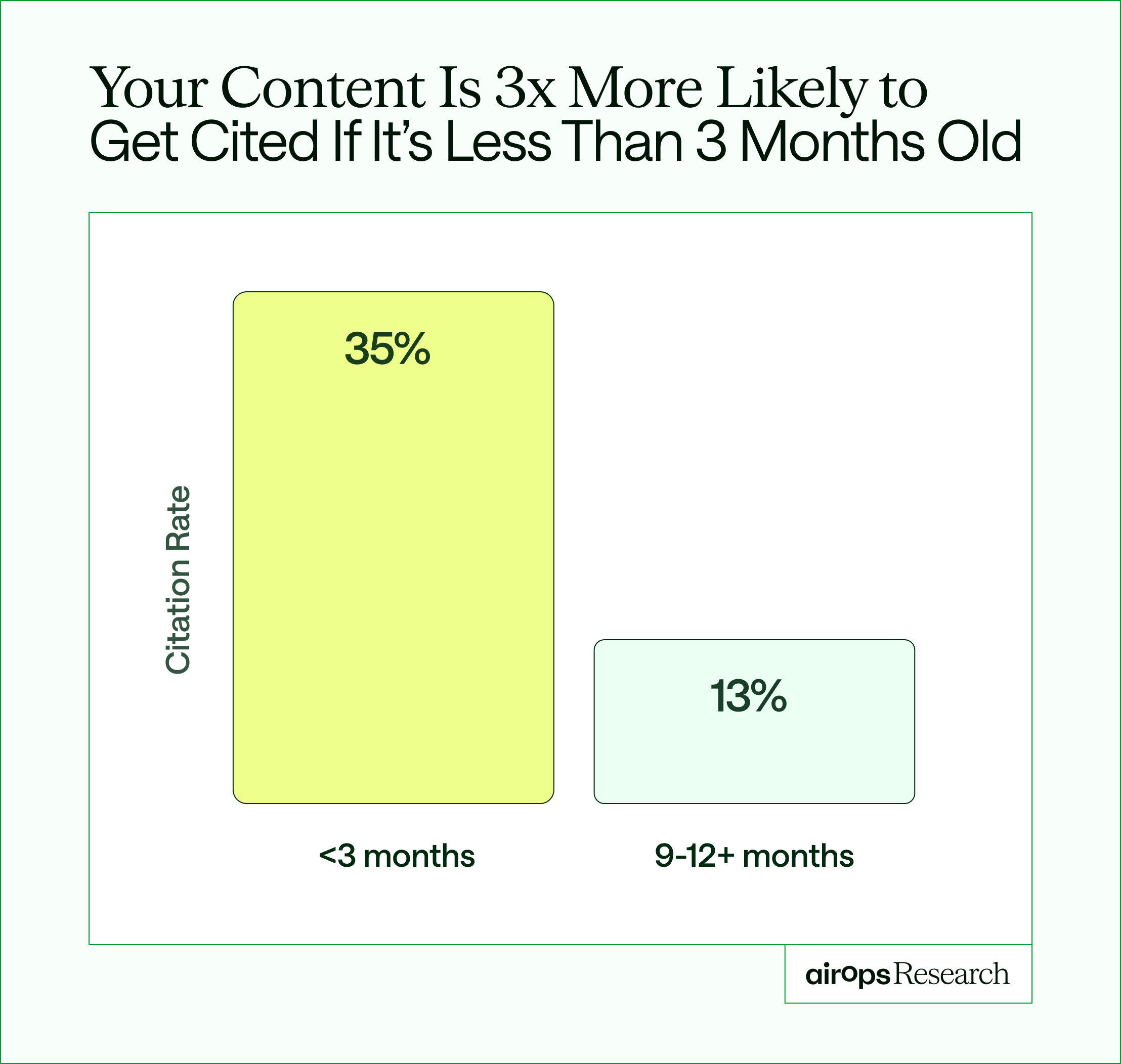
AI visibility also changes faster than most teams expect. Pages that teams fail to refresh at least once per quarter are three times more likely to lose AI citations over time. Structure creates the first opportunity and ongoing review protects it.
The 2026 State of AI Search
That shift explains why AI search optimization cannot stop at publishing. Teams need a repeatable way to identify which pages lost traction and which formats still earn references.
Answer engines like ChatGPT, Perplexity, and Google AI Overviews evaluate more than keywords, and recent shifts in how AI Overviews affect ranking behavior show that structure now determines whether content gets surfaced at all. They look at where answers appear, how sections connect, and whether the page isolates each idea. When AI Overviews appear, organic click-through drops sharply. That makes structure a visibility problem, not just a usability one.
Well-structured content gets cited more often because AI systems can extract information with less guesswork.
- Parsing speed: Clear sections let models find the right passage quickly
- Citation likelihood: Visible answers increase the chance of being quoted
- Interpretation accuracy: Tight formatting reduces misreads
AirOps research confirms this pattern: pages with structured, question-based headings and FAQ sections saw a 2.8x citation lift compared to unstructured pages. SEO for AI starts with making every section extractable.
How ChatGPT generates and selects responses
ChatGPT does not "crawl" in the classic sense. It builds responses from two paths: training knowledge and live browsing.
Training data and historical sources
During training, ChatGPT learned patterns from books, articles, and webpages. Pages that existed before the cutoff date and followed strong structural patterns may still influence how it frames answers.
Live web browsing
With browsing enabled, ChatGPT searches the web and surfaces pages that answer the question clearly. Ranking helps, but structure often decides which result it pulls from. Understanding how ChatGPT selects sources is now a core part of how teams optimize content for ChatGPT citations. The model favors pages that isolate each answer in its own section with a clear heading and a direct opening sentence.
Authority signals that affect citations
AI systems still rely on trust cues:
- Domain reputation: Established sites earn more mentions
- Depth: Full coverage of a topic beats surface answers
- Attribution: Named authors, dates, and cited sources
- External validation: References from credible domains
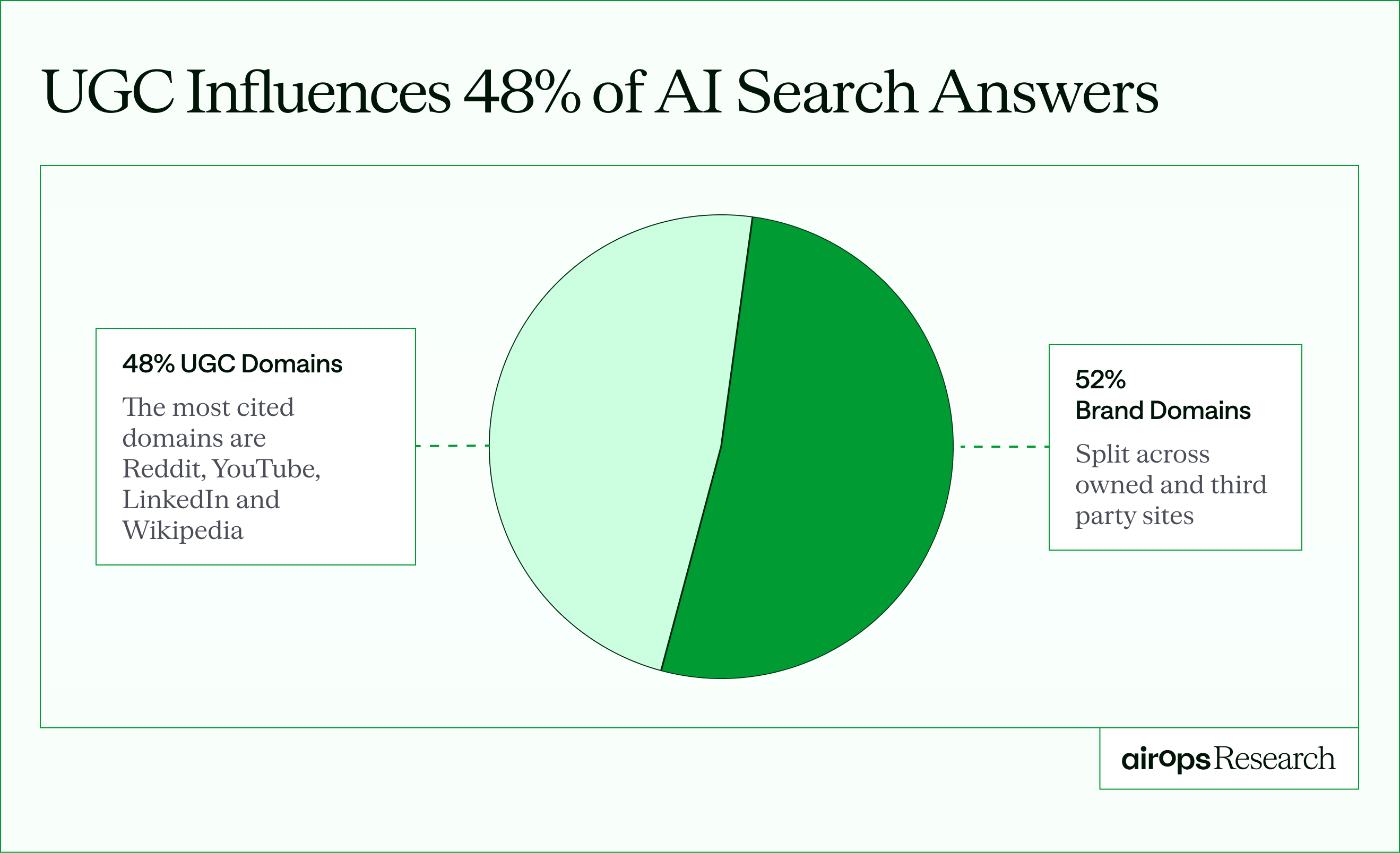
- Community signals: about 48% of AI search citations originate from community platforms such as Reddit and YouTube, showing that off-site discussions increasingly shape what AI tools trust.
The 2026 State of AI Search
How query fanout shapes which content gets cited
When a user types a question into ChatGPT, the model does not send a single query to the web. It decomposes the original prompt into multiple sub-queries, a process known as query fanout. Each sub-query targets a narrower slice of the topic, and the pages that match those sub-queries are the ones in contention for citations.
This is how brands structure pages to win AI citations, and organizing content around common sub-query themes gives you more citation surface area. Steve Toth explains that the clearest, most concise paragraphs within ranking pages are what gets cited, because LLMs prioritize retrieval efficiency.
- Organize sections around the sub-questions your primary topic naturally generates: comparisons, definitions, steps, and use cases.
- Use query fanout data to populate FAQ sections, turning each sub-query into a question with a direct answer.
- Keep each answer block self-contained so it can be extracted independently without needing surrounding context.
This shift explains why brand authority now extends beyond your own domain. If your product, research, or examples appear inside active communities, AI systems treat that context as part of your credibility signal.
Content formats ChatGPT reads best
Different questions call for different layouts. The closer your format matches the query, the easier it is for ChatGPT to reuse.
Question-and-answer sections
Use the exact user question as a subheading, then answer it in the first sentence. This mirrors the same structural logic behind featured snippet optimization, where clear question-answer formatting makes it easier for systems to lift concise passages directly into results.
Example:
What is schema markup?
Schema markup is code that labels your content so search engines and AI tools understand what each section represents.
HubSpot's analysis of 14 million AI citations found that question-based headings have the strongest correlation with getting cited. "That one thing, formatting headers as questions, really moves the needle," noted Aja Frost, who leads HubSpot's global growth strategy.
Lists for procedural queries
Lists work best for "how-to" queries, step-by-step instructions, and topics with multiple options. ChatGPT can easily parse list structures and reproduce them in responses.
Lists do more than improve readability. In our dataset, pages cited by ChatGPT averaged 13.75 list sections per page — more than 17 times higher than traditional page-one results. Nearly 80 percent of cited URLs included at least one structured list, while fewer than one-third of Google's top results did.
Tables and comparison charts
Side-by-side formats work best when users ask comparison questions. When someone types "X vs Y" into ChatGPT, the model looks for pages that already organize differences clearly.
Organize those sections using clear formats that reflect how users scan differences:
- Q&A blocks work well for direct definitions like "What is X?"
- Lists suit step-by-step guidance and tactical questions like "How do I do X?"
- Comparison sections perform best for "X vs Y" queries where features, pros, or limitations need to be contrasted.
- Summary blocks support fast overviews when users ask for a short explanation.
These structures give AI tools clean extraction points, making your comparisons easier to reuse in generated answers.
TL;DR and summary blocks
Summary sections give AI extractable language. Place them right after a major heading or near the end of the article.
TL;DR blocks, descriptive page titles, block quotes, and pages with 20 or more external links all correlate positively with AI citations. Treat summary sections as citation bait: write them so they can stand alone as a complete answer to the section's core question.
Structural choices that improve AI readability
Beyond format choices, specific structural elements make your content more accessible to AI systems. Knowing how to structure content for AI citation starts with these accessible, extractable elements.
Use descriptive headings
Descriptive H2 and H3 headings act as signposts for both readers and AI. Headings that mirror how users phrase questions perform better than clever or vague titles.
In our analysis of more than 12,000 URLs, 68.7% of ChatGPT-cited pages followed a proper sequential heading structure, compared to just under a quarter of traditional page-one Google results. That gap shows how strongly AI tools favor clean hierarchy over ranking position alone.

Why Ranking on Page One Isn't Enough
Keep paragraphs short
Two to four sentences per paragraph works well. Large text blocks bury key ideas.
Steve Toth recommends keeping paragraphs to 100 to 300 tokens for optimal LLM extraction. Paragraphs longer than 600 tokens risk truncation during retrieval, meaning the model may never see the second half of your point. Effective AI content optimization starts with paragraph discipline.
Include real examples
Specific claims beat general statements. Named brands, figures, and dates give AI something concrete to quote.
Original, first-party data earns your brand direct citations from AI engines. Recycled third-party statistics send the citation to the original publisher instead.
Define terms early
Place definitions in the first paragraph where the term appears. That reduces ambiguity in downstream answers.
How semantic signals and entities help AI understand your content
Semantic signals tell AI engines what your page is about beyond the exact keywords on it. When you name the entities, concepts, and relationships tied to your topic, models map your content to more of the questions readers actually ask.
Semantic SEO strengthens content structure for AI search by connecting each section to the wider topic. Use it to reinforce meaning, not to stuff keywords.
- Name the key entities in your topic: the tools, companies, standards, and metrics readers associate with it.
- Link related concepts together so each section supports the page's core answer.
- Define terms the first time they appear, then use them consistently across sections.
- Cover the natural subtopics of your primary question so one page answers a full cluster of related prompts.
Why the first 30% of your page matters most
LLMs do not read your entire page with equal attention. Research cited by Steve Toth shows that the first 30% of a page is the critical zone for LLM citations. The model allocates its retrieval budget to the content it encounters first, which means your most concise, declaratively worded answers need to appear early.
Front-loading applies to both the page and individual sections. Place your strongest answer in the opening paragraph, not after a long introduction. Within each section, lead with the direct response before adding context or examples.
- Move definitions and core answers to the top third of the article.
- Place supporting evidence, edge cases, and examples in the bottom two-thirds.
- Test by reading only the first sentence of each section. If those sentences alone answer the page's core questions, the structure is working.
How to organize pages for AI parsing and citation
Strong structure is not about rigid formatting. It's about helping AI understand what your page is trying to answer, and where each answer lives. When you structure content for Google and ChatGPT at once, one page can rank in search and surface in AI answers.
1. Start with the answer, then explain it
When someone asks ChatGPT a question, they expect the answer immediately. Your content should follow that same pattern.
Open every section with a clear response to the question in the first one or two sentences. After that, add background, examples, or nuance. This answer-first content format structures content for direct answers and mirrors how answer engines generate replies and directly increases your chances of being cited in ChatGPT. When the model can extract a clean answer from the first sentence, it cites with higher confidence.
2. Write headings the way people talk to ChatGPT
Avoid vague or clever headings. Instead, phrase them the same way users phrase their questions.
For example, "How does ChatGPT select sources?" gives AI a clean signal about what the section contains. It also increases the chance that your page matches the exact query pattern used in AI search.
3. Keep related questions close together
AI does not just look at one paragraph in isolation. It tries to understand the full context of a topic.
Group follow-up questions and supporting sections near each other so the page reads like a complete answer set. When a definition, example, and explanation all live in the same area, AI can recognize your page as a reliable reference instead of a loose collection of ideas.
4. Add summary blocks at natural stopping points
Summary sections act like handrails for AI. They provide short, extractable language that reflects your main ideas without forcing the model to piece them together.
Place these summaries after major sections or near the end of the article. Then read them in isolation and ask yourself whether they still communicate the core message accurately. If they do, AI tools are more likely to reuse them correctly.
Technical factors that affect AI comprehension
Strong structure starts with writing, but technical choices decide whether AI tools can even access what you publish.
Use schema markup to label your content
Schema markup is code that adds context around your pages so search engines and AI tools understand what each section represents, and structured data plays a central role in modern answer engine optimization strategies. Article schema, FAQ schema, and HowTo schema don't guarantee citations, but they remove guesswork. When you label definitions, steps, or questions clearly, you make it easier for AI to pull the right passage instead of scanning the entire page.
HubSpot found that FAQ sections correlate with higher citations on their own, and adding FAQ schema on top compounds the effect. Implementing both is one of the fastest structural wins for AI visibility.
Keep HTML accessible
AI tools read HTML directly. Pages that rely heavily on JavaScript or dynamic rendering sometimes fail to expose key sections to crawlers.
A simple test helps here: view your page with JavaScript disabled. If the main content disappears, AI tools may struggle to access it as well.
Link with purpose
Links help AI understand how ideas connect across your site. Thoughtful internal linking patterns turn individual pages into a coherent knowledge system. External links to credible sources signal that your content stands on real research, not just opinion.
Common structural mistakes that hurt AI visibility
The most common structural mistakes bury your answer, overload your paragraphs, or hide your point behind vague headings. Each one gives AI engines less to extract and cite.
Fixing these mistakes is often faster than writing new content. Use this checklist when you audit an existing page for AI content optimization.
- Burying the answer below a long introduction instead of stating it in the first sentence.
- Writing dense paragraphs well over 300 tokens, which risk truncation before the model reaches your point.
- Recycling third-party statistics instead of publishing your own data, which sends citations to the original publisher.
- Using clever or vague headings when a plain question would match how people prompt ChatGPT.
How to test and measure AI visibility
You can't improve what you don't observe. Website structure directly affects ChatGPT visibility, and the only way to know what works is to test. Running your pages through AI tools shows which formats and sections actually surface in answers and which ones disappear.
"Success now means tracking citations, visibility in AI Overviews, and entity clarity — not just rankings or clicks." — Lily Ray, SEO Director at Amsive Digital
Quarterly reviews now play a much larger role than most teams expect. Pages that sit untouched lose relevance in AI answers far faster than they do in classic search. When content goes more than a quarter without meaningful updates, the risk of dropping out of citations rises quickly.
Run live queries in AI platforms
Search your priority questions in ChatGPT, Perplexity, and Google AI Overviews. Look at which sections get reused and which ones never appear. Over time, those differences reveal which formats AI prefers to reference.
Monitor brand and page mentions
Track when AI tools quote your brand name or cite your pages. This signal carries more weight than rankings alone because citations change from prompt to prompt.
Watch community citations
AI tools now draw heavily from off-site conversations. Those off-site references function similarly to brand mentions in search, shaping how AI tools interpret authority even when they don't link directly. Pay attention to whether your brand shows up in Reddit threads, YouTube transcripts, and community roundups tied to your topics. As those mentions increase, citation frequency in AI answers usually follows.
Update pages based on citation patterns
Use what you see to guide the next refresh. If lists surface more often than long paragraphs, restructure the page around clearer steps or summaries. Treat AI visibility as a living signal, not a one-time win.
How do I increase my chances of being cited in ChatGPT?
Structure each section as a self-contained answer block: a direct opening sentence followed by three to five supporting bullets or a short table. Use question-based headings that match how users phrase prompts. Add FAQ schema to reinforce your Q&A structure for retrieval.
Keep paragraphs under 300 tokens so the model can extract them fully. Refresh the page at least once per quarter, since unrefreshed pages are more than twice as likely to lose their citations compared to regularly updated content.
Turning structure into repeatable visibility
Good structure makes individual pages easier for AI tools to parse, but consistency across an entire site takes more than manual edits. Teams need a system that highlights where pages lose visibility, guides structured updates, and tracks whether changes lead to more citations over time.
That's where AirOps fits into the process. It gives content teams a way to identify gaps, refresh pages with AI search in mind, and measure which structural choices actually earn mentions. AirOps is the partner brands bring in for this shift, combining the platform, the media mix, and a team that builds and runs the strategy alongside yours, tied back to pipeline and revenue.
Book a demo to see how AirOps helps teams build pages that earn consistent citations and visibility across AI search.
Frequently Asked Questions
How often should I update content to maintain ChatGPT visibility?
Content should be refreshed at least once per quarter to maintain AI citation rates. Unrefreshed pages are more than twice as likely to lose their citations compared to pages that receive regular updates. Beyond the quarterly minimum, prioritize updates when you notice declining mentions in AI tools or when new information emerges in your topic area that could make existing content appear outdated.
Does word count affect whether ChatGPT cites my content?
Word count matters less than information density and structure. ChatGPT favors pages that answer questions completely without padding, so a well-organized 800-word article with clear sections often outperforms a 2,500-word piece that buries key information in lengthy paragraphs.
Can I optimize the same page for both Google rankings and ChatGPT citations?
Yes, but the priorities differ slightly. Google rewards comprehensive coverage and backlink authority, while ChatGPT prioritizes extractable answer blocks and clean heading hierarchy.
Perplexity leans heavily on recency and tends to cite pages updated within the last 90 days. Google AI Overviews favor pages that already rank in the top 10 organically. Focus on adding summary sections and question-based subheadings to existing high-ranking pages to capture all three channels simultaneously.
How can I align my content structure with ChatGPT's parsing behavior?
Open each section with a direct answer, then use question-based headings that mirror how people prompt ChatGPT. Keep paragraphs under 300 tokens and isolate each idea in its own block so the model can extract it cleanly. This matches how ChatGPT parses pages during retrieval.
How can I use TL;DR sections to improve visibility in ChatGPT?
Place a TL;DR block right after a major heading or near the end of the article, and write it so it stands alone as a complete answer. ChatGPT treats these summary blocks as extractable language it can lift directly into responses. Keep each point to one declarative sentence for the cleanest extraction.
What content structure and formatting helps articles get cited by ChatGPT and Perplexity?
Self-contained answer blocks, question-based headings, short paragraphs, and structured lists help articles get cited by both ChatGPT and Perplexity. Perplexity also weights recency heavily, so refresh pages at least once per quarter. Both engines reward clean heading hierarchy over ranking position alone.
How do I improve my website's structure, schema, and content to be cited in AI responses?
Combine three moves: use sequential heading hierarchy, add Article and FAQ schema to label your content, and lead every section with a direct answer. Schema removes guesswork for AI tools, while clean structure makes each passage extractable. Together they raise your odds of citation in AI responses.
What heading structures work best for AI-readable content?
Sequential, descriptive headings phrased as questions work best for AI-readable content. Match H2 and H3 headings to how users phrase prompts, and keep the hierarchy clean rather than clever. AirOps research found 68.7% of ChatGPT-cited pages followed a proper sequential heading structure.
Does a table of contents help with ChatGPT visibility?
A clear table of contents helps ChatGPT visibility by mapping your page's structure and signaling how sections connect. It reinforces your heading hierarchy and gives the model a clean outline of the answers on the page. Pair it with descriptive, question-based headings so each entry matches how readers phrase prompts.
What is the difference between traditional SEO and AEO-optimized content?
Traditional SEO optimizes for ranking position, while AEO-optimized content structures each answer so AI engines can extract and cite it. SEO rewards backlinks and comprehensive coverage, and AEO rewards clean heading hierarchy, self-contained answer blocks, and direct opening sentences. Structure content for both Google and ChatGPT by leading with the answer, then adding the depth that search rankings still reward.
Get the latest on AI content & marketing
