- Content decay shows up as steady, measurable losses in rankings, clicks, and conversions on pages that once performed well
- Click-through rate drops often appear first, signaling a mismatch between your listing and current search intent
- Slow ranking drift across multiple keywords matters more than one-off position changes
- Defined thresholds turn detection into a process, giving teams clear triggers for when to refresh
- Focused updates restore performance faster than full rewrites in most cases
- Regular audits protect high-value pages before small declines become major traffic problems
Content decay quietly chips away at visibility, traffic, and revenue. Most teams don't notice until a page that used to "just work" starts missing goals.
This guide gives you a practical way to stay ahead of those drops. You'll learn what content decay means, why it happens, how to confirm it with data, and how to build a simple system that makes updates routine instead of reactive.
What is content decay?
Content decay is the gradual loss of rankings, traffic, and visibility on a page over time. A post can perform well for months or even years, then begin sliding as search intent shifts, competitors improve their coverage, and details in the topic change.
The first signs often feel small. Traffic may dip 20–30% quarter over quarter without any clear technical problem. Rankings can drift from positions 1–3 to page two over a few months. Click-through rate can drop even when impressions hold, usually because the title and description no longer match what searchers want.
AirOps research shows pages that go more than a year without updates are twice as likely to lose citations and market share to competitors. Even modest ranking slips can create meaningful traffic losses, so early detection pays off.
The content lifecycle and when decay begins
Every piece of content follows a predictable arc. Understanding that arc makes content decay identification faster and more accurate.
- Early traction (weeks 1 to 3): The page gets indexed and begins earning initial impressions. Rankings fluctuate as search engines test placement.
- Growth (months 1 to 3): Traffic climbs as the page settles into stable positions. Backlinks accumulate and engagement signals strengthen.
- Peak (months 3 to 6): The page reaches its highest traffic and ranking performance. This is the window where most teams stop paying attention.
- Plateau and early decay (months 4 to 8): Performance levels off, then begins a gradual decline. In a recent AirOps webinar, one content leader noted that pages typically plateau around the four-month mark, with consistent slipping after that.
- Decline (month 6 and beyond): Without a refresh, traffic continues falling. Competitors publish newer coverage and search intent evolves past what the page offers.
Teams that refresh content within the plateau window recover 25 to 30% of lost rankings and citations, according to Oyster HR data shared at an AirOps webinar. Waiting past six months often means a full rewrite instead of a targeted update.
Why content decay happens
Search engines aim to surface the most relevant, useful answers available at any moment. Over time, older pages start competing with newer content that reflects current expectations. That shift alone can push yesterday's best answer down the results.
In practice, decay usually shows up through a few recurring patterns:
Common causes of content decay
- Stronger competitors: Newer pages offer deeper coverage, clearer structure, or better examples.
- Shifting intent: Searchers approach the topic from a different angle or expect a new format.
- Outdated details: Facts, screenshots, and step-by-step instructions no longer reflect how things work today.
- Quiet technical drag: Slower load times, broken internal links, and weaker on-page experience gradually erode performance.
- Content cannibalization: Multiple pages on the same site competing for identical keywords split authority and confuse search engines about which page to rank.
Some topics also carry a built-in freshness bias. On fast-moving queries, Google tends to favor recent information. A page can lose ground even when nothing is technically wrong, simply because searchers want the latest answer.
That difference in topic speed should guide how often pages get attention:
- Fast-changing subjects need frequent updates to stay competitive.
- Evergreen guides usually benefit from lighter maintenance focused on clarity, examples, and internal linking.
That freshness bias is not theoretical. AirOps research shows that pages not updated at least quarterly are three times more likely to lose AI citations, especially once fresher alternatives appear. Even outside AI answers, the same pattern holds: content that falls behind expectations loses visibility faster than most teams anticipate.
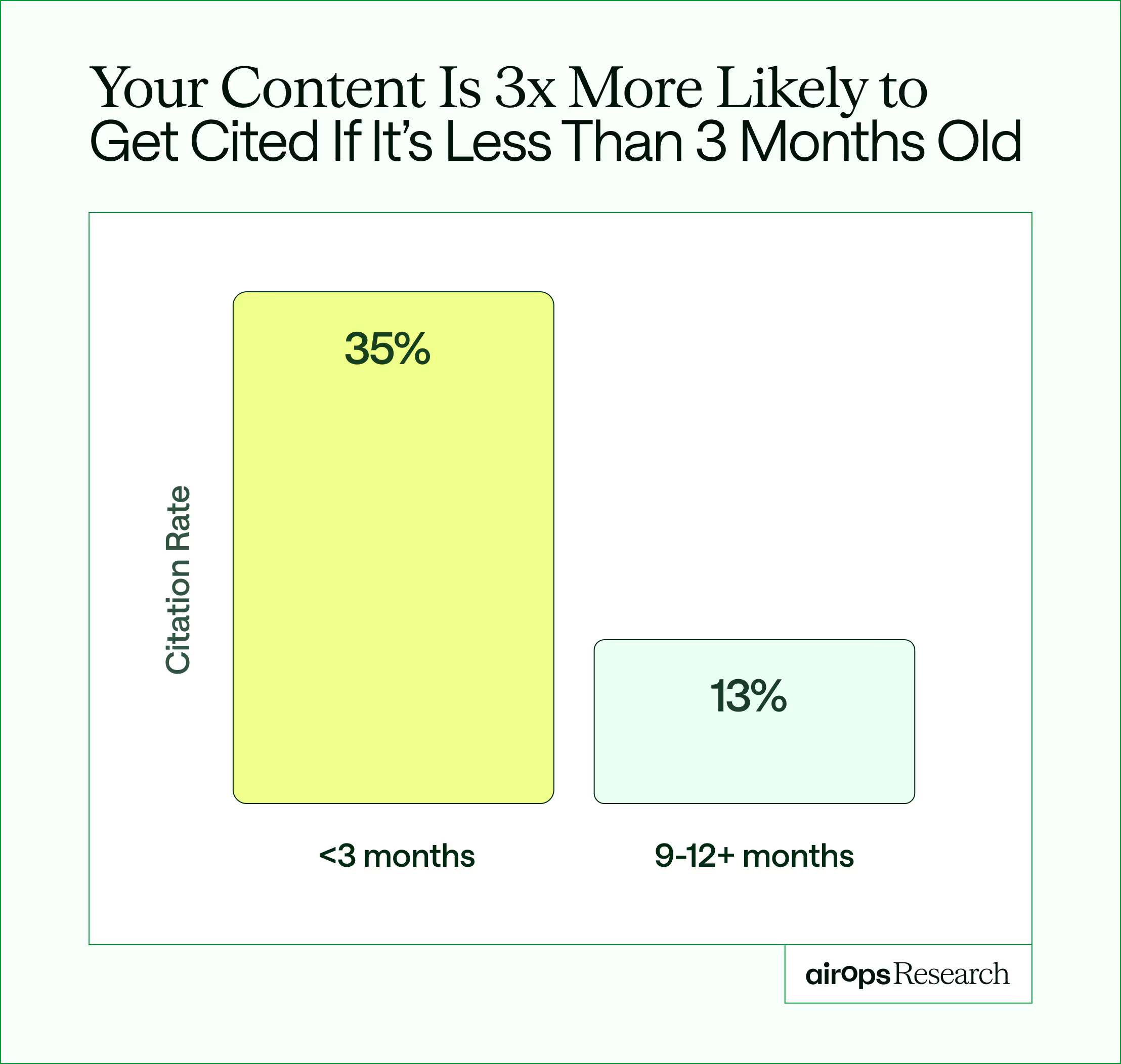
Freshness plays a larger role than many teams realize. More than 70% of high-performing pages search results were updated within the past 12 months. In practical terms, a year-old page often competes at a structural disadvantage against newer, more current answers.
Rather than arriving as a single dramatic failure, content decay shows up as small mismatches between what a page offers and what searchers need right now.
How content decay accelerates in AI search
Content decay hits harder in AI search than in traditional rankings. Answer engines like ChatGPT and Perplexity rely even more heavily on recent web signals when selecting sources to cite.
- Freshness bias is stronger in AI search. AI-cited content is 25% more recent than Google-ranked content on average. Content cited on ChatGPT is 1.2 years more recent than the typical indexed page.
- Citation loss compounds faster. Unrefreshed pages face 3x citation loss compared to pages updated within the last quarter. Once an AI engine drops your page from its citation pool, regaining that position takes longer than recovering a traditional ranking.
- Structure matters for AI extraction. Properly structured content earns a 2.8x citation lift over unstructured pages. When refreshing decaying content, restructuring headings and answer formats for LLM consumption is as important as updating the information itself.
- Visible last-updated dates correlate with more citations. Pages that display a recent update timestamp earn more AI citations across nearly all engines, according to data shared at a recent AirOps webinar.
For teams tracking both SEO and AEO (Answer Engine Optimization) performance, content decay monitoring workflows need to include AI citation tracking alongside traditional rank tracking. A page can hold its Google position while quietly losing all AI visibility.
Key signs of content decay in blog articles
Content decay rarely happens all at once. It shows up gradually, often in subtle ways that are easy to miss if you only look at traffic. Knowing the signs of content decay in blog articles helps teams catch decline before it reaches the traffic numbers.
- Click behavior often changes first. When impressions stay steady, but clicks begin to fall, your title or meta description may no longer match what searchers expect. That mismatch can appear weeks before the rankings move.
- Engagement provides another clue. Readers spend less time on pages that feel outdated or incomplete. Bounce rate rises. Scroll depth drops. Comments, shares, and backlinks tend to slow down too, especially on posts that used to spark conversation.
- Rankings usually follow. Instead of one dramatic crash, you'll see gradual declines across a range of keywords. Featured snippets and People Also Ask placements can disappear as newer pages replace yours.
- Your own site search can expose gaps as well. If visitors repeatedly search for questions the article should already answer, the page likely needs a refresh.
How to confirm it's content decay (and not something else)
Not every traffic drop points to decay, and rewriting content too quickly can waste time when the real issue sits somewhere else.
Seasonality often explains performance dips. If overall interest in the topic falls, your page may be performing normally while the broader market slows down. Check whether related pages show similar patterns and compare performance year over year to see if the change aligns with historical trends.
Technical problems can also look like decay while behaving very differently. A page that falls out of the index, picks up an unexpected canonical tag, or loses crawlability will decline regardless of content quality. Start by checking indexing status and basic page health so a refresh lands on a page that can still compete.
Tracking issues creates another common false alarm. Broken tags, filter changes, or a messy analytics migration can make traffic appear down even when real demand remains stable. If analytics shows a sharp drop while Search Console impressions and clicks hold steady, investigate tracking before you adjust the content.
A quick confirmation checklist before starting a refresh:
- Rule out seasonality by comparing year-over-year performance for the same period.
- Verify indexing status and crawlability in Search Console.
- Confirm analytics tracking is intact and no filters have changed.
- Check whether the content decay traffic drop is isolated to this page or affects a broader set of URLs.
- Review the SERP for new competitors or format changes that may explain the shift.
Rankings still matter, but they are no longer the whole picture. Roughly 60% of AI Overview citations come from pages outside the top 20 organic results, which means visibility often shifts before rankings collapse. That's why engagement signals, CTR trends, and SERP composition frequently reveal decay earlier than position alone.
New pages also need time to stabilize. For most sites, content under about three months old is still settling in the SERPs. For anything between six and twelve months, rely on shorter baselines and treat conclusions as provisional rather than final.
How to detect and measure content decay
Content decay is easiest to spot when you work from clear baselines instead of gut checks. Building a content decay monitoring workflow around consistent baselines turns detection into a repeatable process rather than a periodic scramble.
1. Set a baseline you trust
Start by choosing a comparison window that fits the page:
- Three months works well for recent posts still settling into the SERPs.
- Twelve months fits mature pages where seasonality matters.
Focus on trends, not blips. One bad week rarely means anything. A steady slide across several weeks usually signals a real change.
2. Watch for early traffic signals
Traffic shifts often appear first.
A page deserves closer review when:
- Traffic drops 15–20% month over month for multiple weeks
- There's no clear seasonal explanation
- Conversions decline alongside visits
When both traffic and conversions move together, move the page higher on your priority list.
3. Check rankings across the keyword set
Next, zoom out from individual keywords.
Gradual declines across many queries point to a broader relevance issue. Pages sitting near the bottom of page one carry extra risk, because even a small slip can push them to page two and cut clicks quickly.
4. Use engagement to confirm intent fit
Engagement trends help validate what the rankings suggest.
Key signals to watch:
- Impressions hold steady while CTR drops
- Bounce rate increases
- Time on page shortens
Together, these usually indicate the page no longer matches what searchers expect from the result.
5. Review the SERP itself
Finally, look directly at the search results.
If newer pages consistently outrank yours, or if the SERP now favors richer formats and clearer answers, the issue is usually relevance rather than a technical failure.
Tools most teams already use
You can run this entire analysis with a simple stack:
- Google Analytics for traffic and conversion trends
- Google Search Console for impressions and CTR
- A rank tracker for keyword movement and SERP feature loss
The challenge isn't data availability. It's pulling these signals together fast enough to act.
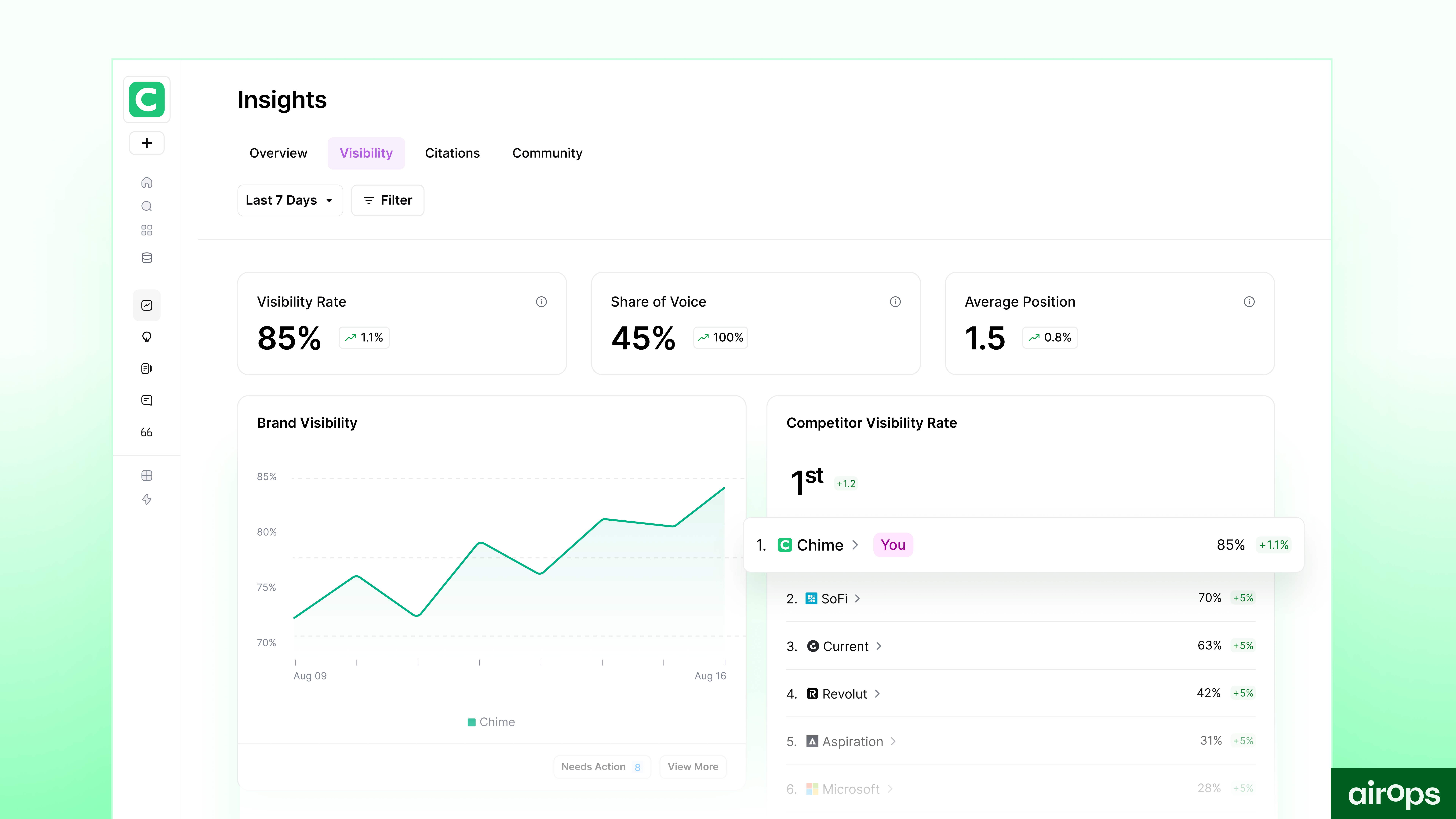
AirOps helps remove that friction by bringing performance trends, at-risk page alerts, and structured refresh planning into one workflow, so teams can move from detection to action without stitching together reports.
Turn detection into action with simple thresholds
Clear thresholds keep the process objective. Instead of debating whether a page "feels down," set rules that trigger review.
Separate the process into two stages:
- Investigate early drift when you see signals like CTR softening while impressions hold, or a steady multi-week traffic slide without a seasonal explanation.
- Move to a refresh when multiple signals stack together. A practical combination might include traffic down about 20% for two straight weeks, CTR dropping sharply while rankings hold, and average position slipping across your target keyword set.
The goal is not perfect thresholds. The goal is consistent thresholds that everyone on the team understands and follows.
Example: what decay looks like in numbers
A typical decaying page can look healthy in the moment and still lose ground over time.
In month one, it earns 8,200 visits with an average position of 3.2 and a CTR of 14%. By month three, visits drop to 6,700, average position slips to 4.8, and CTR falls to 11%. At month six, the page sees 4,900 visits, an 8.1 average position, and an 8% CTR.
No single week looks alarming. The trend is the signal. Pages with patterns like this should move to the top of your refresh list.
Content decay vs content pruning
Content decay describes performance fading on a page you still want to keep and improve. Content pruning is the choice to remove or consolidate pages that no longer add value. In an SEO context, content pruning removes dead weight from your index so search engines spend crawl budget on pages that can still compete.
Update when the page still supports a business goal and has a clear path to recovery. Prune or consolidate when the page duplicates stronger content, conflicts with more important pages, or has little chance of ranking again. Leave it alone when it performs steadily and only needs minor maintenance. When the topic is obsolete but the URL still has equity, redirect it to the closest evergreen page so you preserve existing value.
How to fix and reverse content decay
Targeted improvements usually restore relevance and make the page easier to use.
Start where intent lives: the opening. If the introduction does not clearly confirm that the page answers the searcher's question, rewrite it first. From there, look for obvious gaps. Add sections that reflect how people discuss the topic today, and update outdated stats, examples, screenshots, and step-by-step instructions. These focused changes often deliver fast wins because they rebuild trust and clarity.
After that, improve how the page works for readers. Strengthen headings so the structure is easier to follow, and make the content more scannable. Add internal links to newer, more useful pages to connect the article to the rest of your site. Include a visual or two when it helps readers grasp an idea quickly.
If those updates do not fully recover performance, move into deeper improvements. Expand thin sections, add an FAQ based on real queries, and adjust headings to target featured snippets. Improve mobile readability and page speed where possible, and update schema to help search engines understand the content more clearly.
Ground every refresh in competitive review. Study what page-one winners include that your page misses, such as angles, examples, format, and depth. Use those insights to shape a focused refresh brief instead of guessing at changes. Structure the refreshed page for AI extraction as well. Properly structured content with clear heading hierarchies and direct answer formats earns a 2.8x citation lift over unstructured pages.
Kevin Indig highlighted this in a recent AirOps webinar.
Content refresh is always in my top 3… Google rewards that with a freshness signal." — Kevin Indig
Consistent updates keep pages aligned with current intent, modern examples, and the way people search today. When refreshes become part of your normal workflow instead of emergency work, decay loses most of its power.
Example: Docebo, a global learning platform, used AirOps to standardize refresh briefs, prioritize high-impact pages, and automate repetitive checks. Within weeks, the team accelerated updates, regained page-one rankings, and earned more AI citations.
Most pages that recover do so within about 60 days after a meaningful refresh, and early improvements often show movement within a few weeks.
Build a simple content decay operating model
Content decay becomes manageable when you treat it as a routine process instead of an occasional rescue project. Recognizing recurring content decay patterns across your site helps you set a content refresh cadence that prevents most decline before it starts. A practical starting point is refreshing high-value pages every six to twelve months, with faster cycles for competitive topics. A few lightweight structures can keep performance stable without adding heavy overhead.
Set the cadence
Start with predictable rhythms. Your highest-value pages deserve regular attention because they generate most of your traffic and revenue. Treat them like ongoing assets rather than finished projects. A light quarterly review for top performers usually prevents the steep declines that require full rebuilds later.
Match the review cadence to impact and topic speed. High-value pages benefit from frequent check-ins because small slips hurt the most. Recent posts need closer monitoring while they settle into the SERPs, and evergreen resources often do fine with slower, more deliberate reviews.
Refresh patterns from high-performing pages help define what normal looks like. AirOps analysis shows that among pages consistently earning visibility, 53.4% were refreshed in the last six months and 35.2% were updated within the last three months. Those benchmarks make it easier to plan a realistic schedule instead of guessing.
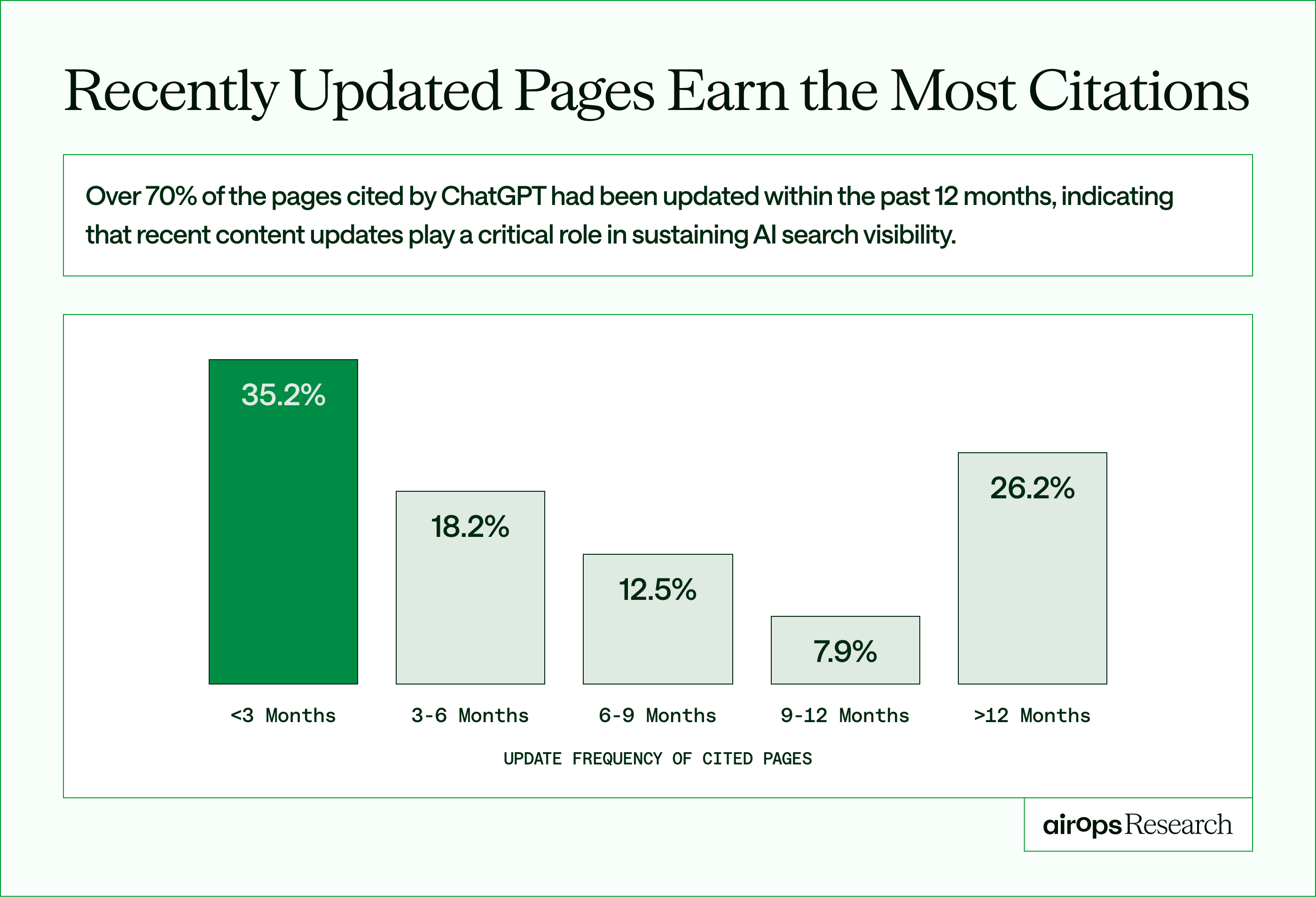
A practical rhythm that mirrors those patterns might include weekly alerts for major traffic drivers, monthly reviews for newer content, quarterly audits for evergreen guides, and at least one deep review each year for cornerstone assets. The exact mix can vary by team, but the principle stays the same. Regular, predictable attention prevents most decay before it becomes a problem.
Make ownership and refreshes repeatable
Keep the workflow simple and repeatable. Assign clear owners to page groups so nothing falls through the cracks, and use the same refresh template for every update to maintain consistent quality. Track what happens after each refresh so the process improves over time. When thresholds trigger action automatically, the team spends less time debating priorities and more time improving content.
Good habits also reduce future work. Avoid time-bound language that forces constant rewrites, and add calendar reminders for cornerstone guides. Treat major competitor updates or meaningful product changes as natural prompts to revisit related pages. Small, steady maintenance beats large, urgent fixes.
Prioritize pages based on business impact so effort flows to what moves the needle. Watch leading indicators like CTR and engagement to catch drift early, and track recovery after refreshes to capture what worked. That feedback loop makes your operating model smarter over time without adding more meetings or overhead.
In AirOps, you can see which pages are slipping, almost on page one, or could be cited for the wrong topics. Our Insights and Pages dashboard shows you exactly where you stand.
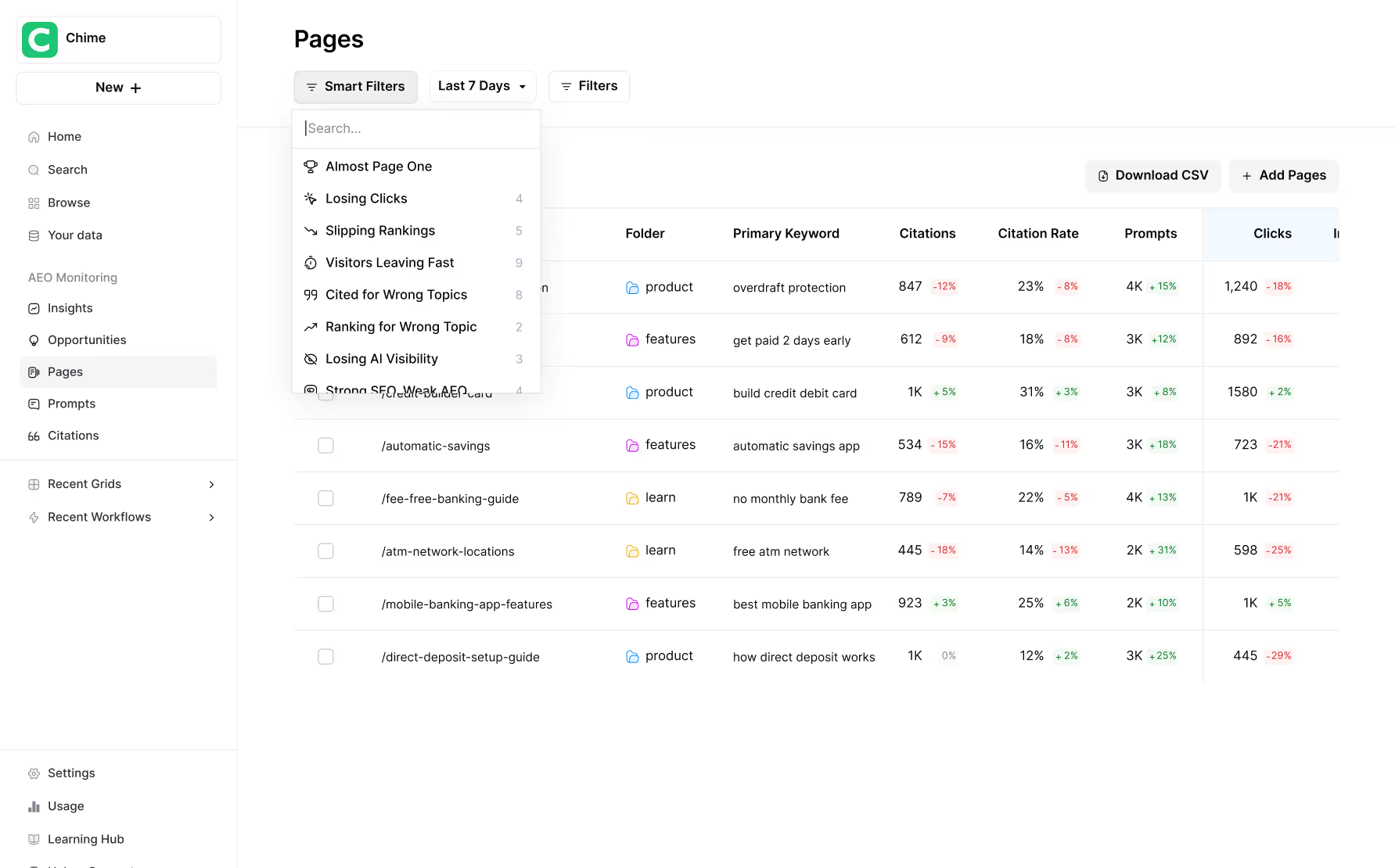
Page360 in AirOps
Train teams to spot and act on decay
A system only works when the people using it understand what they are looking for.
Make decay detection part of normal team behavior instead of a specialized SEO task. Create a short playbook that defines decay in your own metrics and language, and walk through real examples from your site during monthly reviews so writers and editors learn to recognize patterns on their own pages.
Give the team simple tools to act quickly. A one-page checklist can guide people through the basics, such as reviewing CTR trends, comparing current rankings to historical baselines, scanning for outdated facts, and confirming that the page still matches search intent. Automatic alerts for threshold breaches remove guesswork and keep attention focused on the right pages.
Encourage ownership at the page level. When each editor or content owner is responsible for a defined group of pages, small problems get caught earlier. Teams that recognize decay within about 30 days usually fix it with focused updates, while teams that wait six months often need expensive rebuilds.
Training does not need to be complicated. Clear definitions, concrete examples, and consistent routines are enough to turn decay management into a shared skill instead of a bottleneck.
Turn content decay into a repeatable system
Managing content decay starts with simple, consistent habits. Track page performance against clear baselines, watch for early signals like CTR drops and ranking drift, and act on defined thresholds instead of waiting for major traffic losses. When those steps happen on a regular cadence, detection becomes routine rather than reactive.
Over time, those small actions add up to a reliable operating rhythm. Teams can refresh high-value pages faster, prioritize updates based on real business impact, and keep entire content libraries aligned with what searchers need right now.
AirOps helps turn that rhythm into a practical workflow. AirOps brings performance trends, at-risk page alerts, and structured refresh planning into one place. Instead of piecing together spreadsheets and scattered reports, teams see a clear view of what to update, why it matters, and what to do next.
AirOps is the partner for this shift, bringing the platform, the media mix, and a team that builds and runs the strategy alongside yours, tied back to pipeline and revenue.
Treat content decay as an ongoing operational process rather than an occasional cleanup project. Measure consistently, refresh intelligently, and publish with confidence.