AirOps Now Tells You What's Driving Your AI Search Sentiment, and What to Do About It
When someone asks ChatGPT or Perplexity about your product category, the answer they get reflects a consensus built from everything that's been written about you online — review sites, community forums, comparison guides, support threads. Your customer service reputation. Which use cases you're strong in. Where you fall short. How steep your learning curve is.
That collective narrative shapes what AI says about you. And until recently, influencing it has been a guessing game. Teams knew something was driving negative sentiment, or that visibility was inconsistent, but had no way to measure the scale of the problem, pinpoint where the source content lived, or measure progress against it.
Today we're launching two features that close that gap. In AirOps Insights, you’ll now find the Sentiment Tracking, which surfaces the positive and negative themes in AI Search responses about your brand and the specific pages that shape them. Additionally, Query Fan-outs show the exact searches AI runs behind the scenes when it collects information to inform it’s responses.
Sentiment Tracking: From Opinion to Source
Most AEO tools give you a sentiment score. That's useful as a headline number. But a score by itself doesn't tell you what's driving it, and it definitely doesn't tell you what to do next.
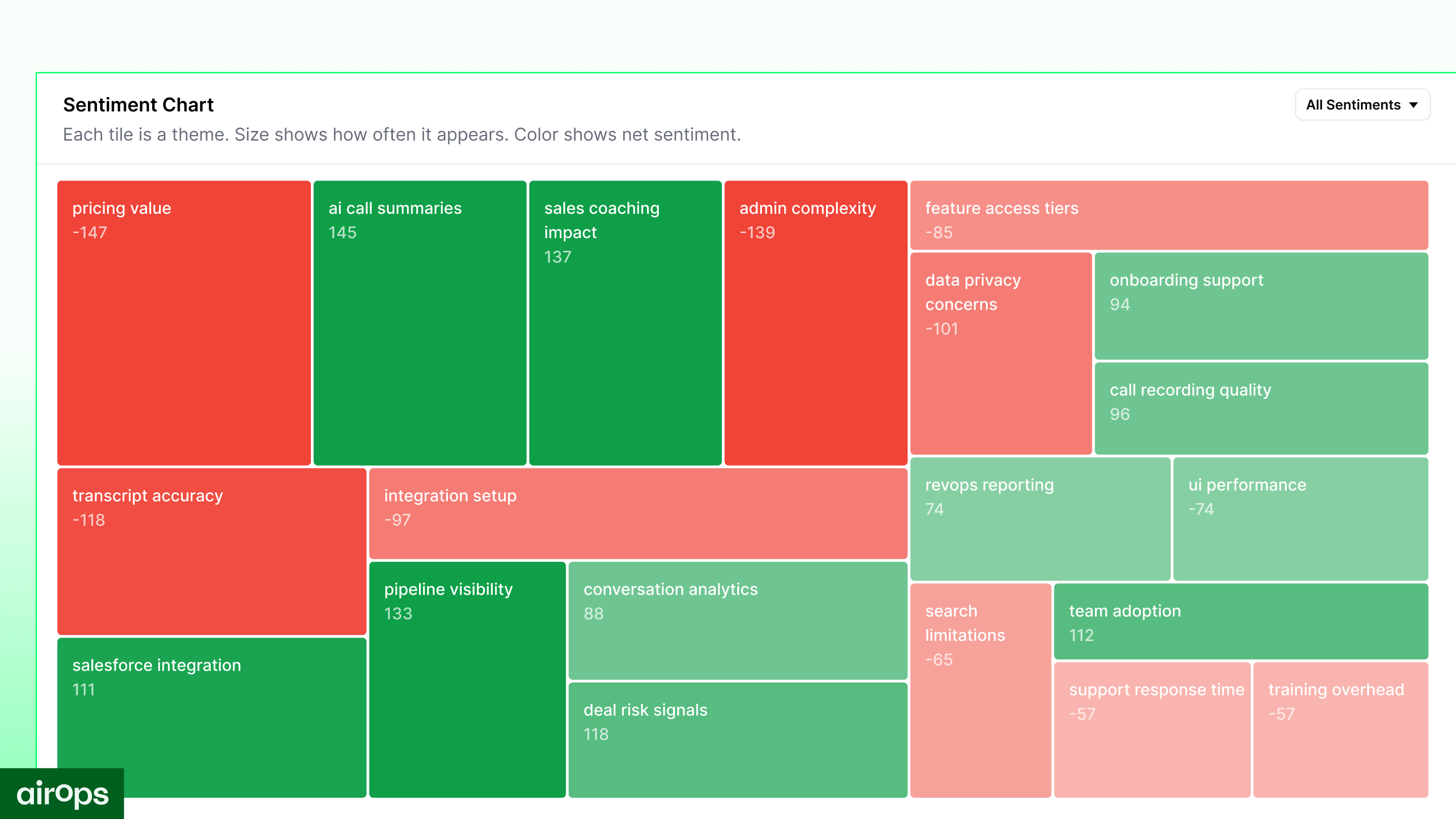
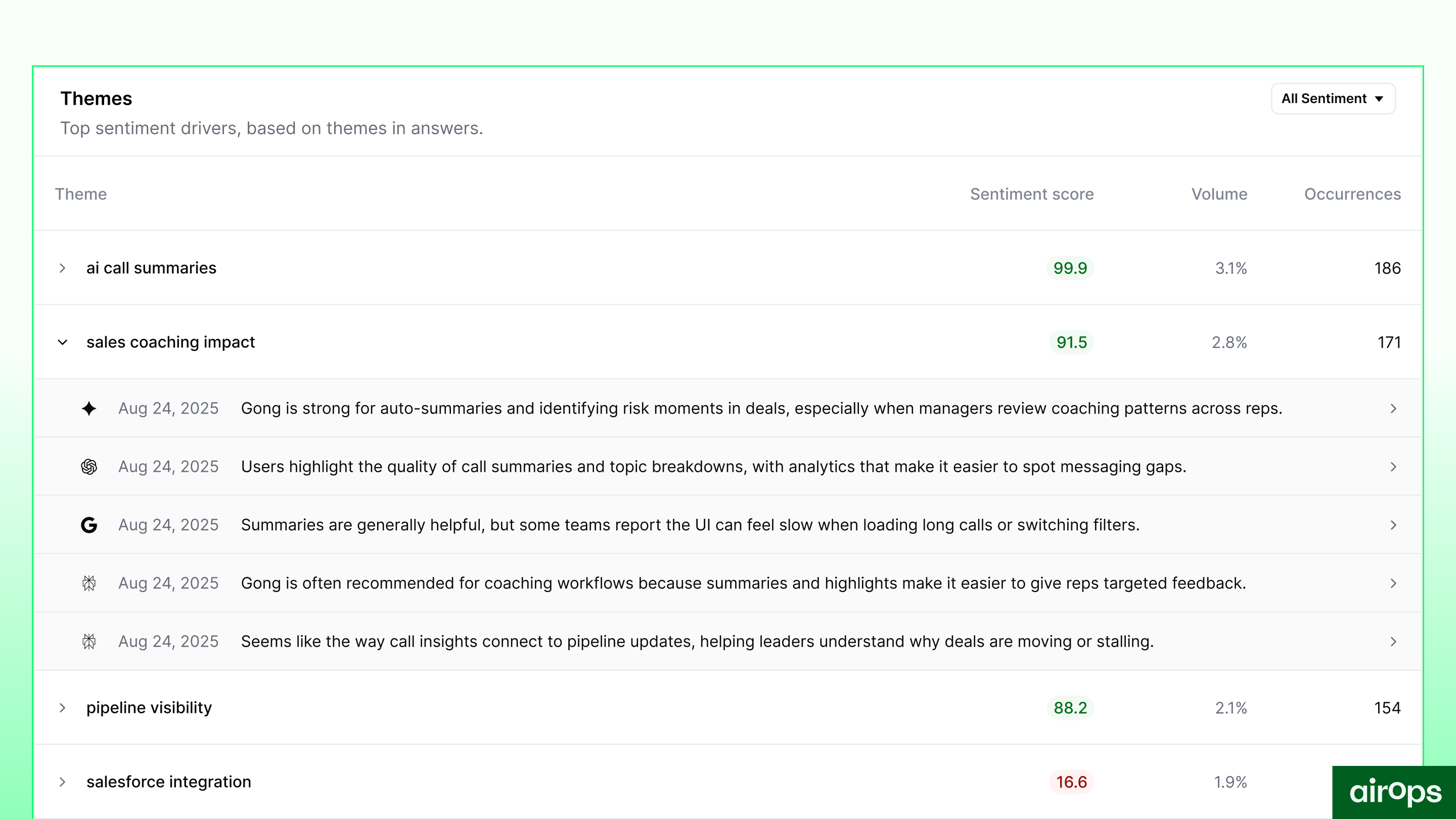
The Sentiment Tracking in AirOps goes further. It surfaces the specific themes shaping how AI engines characterize your brand, and connects those themes back to the pages behind them. So instead of knowing that sentiment is "71 and trending down," you know that "limited documentation" is a recurring negative theme, and you can see exactly which pages are being retrieved when AI engines generate answers that include that framing.
What it shows:
- Your Sentiment Score across AI platforms, broken down by ChatGPT, Perplexity, Gemini, Google AI Mode, and Google AI Overviews
- The sentiment themes driving positive and negative characterizations of your brand
- The specific pages being retrieved that are shaping those themes
- Sentiment tracked over time, so you can see whether the actions you take are actually moving the needle
- A competitive sentiment leaderboard showing how your brand narrative compares to the competitors you're tracking
Why this matters:
The gap between "we have a sentiment problem" and "we know exactly what's driving it and where to act" is where most teams get stuck. Knowing the score doesn't tell you whether the issue lives in your own content, in third-party coverage, in a Reddit thread that ranks well, or somewhere else entirely.
When you can see the source pages, you can act on them. Refresh the content that's driving a negative theme. Participate in high impact conversations. Double down on what's generating positive characterization. Brief your team on which specific talking points need to show up in new content.
The AirOps team builds and runs this strategy alongside your own, so you never have to carry it alone. We refresh the owned content driving each theme, and we earn placements in the third-party sources AI already trusts.
Query Fan-outs: The Searches AI Is Running to Understand Your Brand
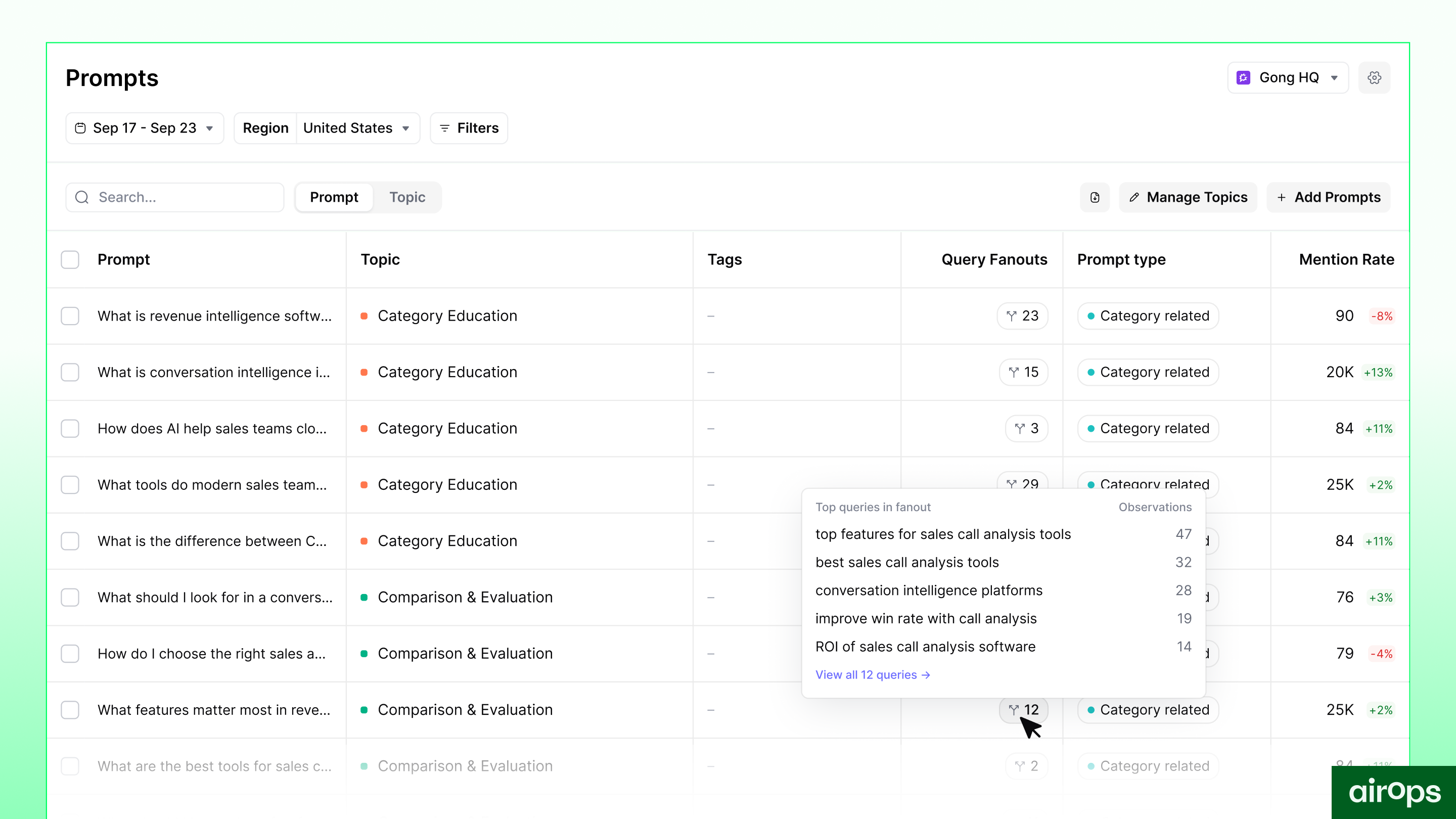
Here's something that explains a lot of AI search volatility: when a user types a prompt into ChatGPT or Perplexity, the engine doesn't run that single query. It generates a set of sub-queries (known as fan-outs) and uses them to gather information before composing an answer.
Query fan-out happens particularly for questions where the model determines it needs timely or long-tail information. This is one of the main reasons why the long-tail and content freshness have become core focus areas for enterprise content teams.
A prompt like "Which CRM tool are enterprises talking about in 2026?" produces three-five distinct searches behind the scenes. Which queries get generated determines which content gets retrieved from SERP, which brands get surfaced, and what the final answer looks like. Two runs of the same prompt can produce different results because the fan-out queries vary due to the probabilistic nature of models.
Most teams have had no visibility into this. Content decisions have been made based on the surface-level prompt without any way to know what the engine was actually looking for underneath it.
What query fan-outs show:
- The actual sub-queries AI engines generate when researching your tracked prompts
- Which fan-out queries your content is covering well vs. missing entirely
- How fan-out patterns differ across platforms
Why this matters:
If you know the queries AI is running, you can write content that answers them directly. That's a meaningfully more precise lever than optimizing for the prompt itself.
It also closes a gap that's been frustrating teams for a while. When visibility is inconsistent, you rank well sometimes and disappear other times, fanout variation is often a significant part of why. You might have strong coverage for three of five fan-out queries. The runs where the engine happens to weight the two you're missing will produce worse results for you. Now you can see exactly which queries you need to cover.
How They Work Together
These two features are most powerful when you use them in sequence.
Here's what that looks like in practice: a B2B company notices that "lack of documentation" keeps surfacing as a negative sentiment theme. They can see which pages are being retrieved when that theme appears in AI answers. They decide to build out their docs to address the gap directly.
Before they publish, they use Query Fan-outs to see the specific searches AI ran when it researched the prompts that generated that negative sentiment. They make sure the new docs pages have strong coverage for those exact queries, so the content they're creating is actually positioned to get retrieved and change the narrative, not just exist on their site.
That's the loop: sentiment surfaces the problem and the source, fan-outs tell you the queries you need to target to fix it.
A few more examples of what this looks like in practice:
- New product launch not showing up in AI answers. Sentiment Tracking shows your new product isn't being mentioned at all in relevant prompts. Query Fan-outs reveal the searches AI is running in your category. You launch a targeted content refresh and an outreach campaign to earn placements on the third-party sites being retrieved for those queries, and start building a footprint where it didn't exist.
- Pricing change creating negative sentiment. You updated pricing six months ago, but outdated figures are still circulating across review sites and comparison guides. Sentiment Tracking flags pricing as a recurring negative theme and shows exactly which pages are being retrieved. You know where to focus your outreach and what content needs updating to get the right information into AI answers.
- Product perceived as too complex. AI answers keep characterizing your product as difficult to learn. Sentiment Tracking surfaces complexity as a consistent negative theme. Query Fan-outs show the specific searches AI runs when it researches onboarding and ease-of-use prompts in your category. You create YouTube walkthroughs, refresh your help center, and build comparison content with concrete proof points, all targeted at the exact queries driving that perception.
One of the more underrated uses of Sentiment Tracking is simply monitoring how your narrative evolves over time. As you launch campaigns, earn new placements, or refresh content, you can watch whether sentiment is actually shifting in the direction you intended. It turns what used to be a gut-feel question ("is our positioning landing?") into something you can measure and adjust against. That's useful not just for troubleshooting problems, but for understanding where your brand stands in the market and whether the story AI tells about you matches the one you're trying to tell.
.png)
Available Now
Both features are live in AirOps Insights. Sentiment data, including themes and source pages, is available across all platforms in your tracking set. Query Fan-outs are visible at the prompt level in the Prompts tab.
AirOps already offers 3× more capabilities through our Claude App and MCP than any other Insights tool, and we will add full sentiment and query fan-out data in the next two weeks.
If you're already on AirOps, you'll see both in your workspace now.
Want to walk through what the data shows for your category? Book time with our team →
Get the latest on AI content & marketing
