7 Best SEO Reporting Software Tools for SEO & Content Ops Teams
.avif)

- SEO reporting expanded beyond rankings and traffic to include AI search visibility across platforms like ChatGPT and Google AI Overviews
- Teams shifted from manual data assembly to automated reporting that pulls from multiple sources in one place
- Reporting tools still separate insights from execution, leaving teams to manage updates manually
- Different platforms specialize in either analysis, visualization, or workflow efficiency depending on team needs
- AirOps connects reporting insights directly to content updates, reducing the time between identifying issues and fixing them
Your team already has the data.
You pull from Google Search Console. You’ve got GA4 dashboards. Maybe you export rankings from Ahrefs or Semrush. But turning all of that into something leadership can understand and act on still takes hours every week.
Reporting has also gotten more complex. Visibility no longer lives in blue links alone. It shows up in AI search results, ChatGPT answers, Reddit threads, and third-party citations.
This guide breaks down the best SEO reporting software tools for teams that need more than dashboards. You’ll see which tools help you report clearly, which help you scale, and which actually connect reporting to action.
SEO reporting software comparison table
How we evaluated these tools
We looked at what actually matters for teams running SEO reporting at scale:
- Reporting depth: Can the tool combine rankings, traffic, backlinks, and technical data into something usable?
- Scalability: Does it automate reporting across multiple sites or clients?
- AI search visibility: Does it track presence in ChatGPT, Gemini, and Google AI Overviews?
- Flexibility: Can you tailor reports for different stakeholders?
- Usability: Does it reduce manual work or add more overhead?
- Actionability: Does it help teams move from insight to execution?
What is SEO reporting software?
SEO reporting software pulls together data from tools like Google Search Console, GA4, rank trackers, and backlink databases into one place.
Its job is simple: turn raw SEO data into something teams can understand and use.
Instead of exporting spreadsheets and stitching together screenshots, these tools:
- Aggregate data automatically
- Visualize trends over time
- Translate metrics into insights
- Deliver reports to stakeholders
The best tools go further. They don’t just show what happened. They help teams decide what to do next.
What makes a great SEO reporting tool?
A strong reporting platform should:
- Pull data automatically from multiple sources
- Unify metrics into one clear story
- Support different audiences, from executives to developers
- Track AI search visibility, not just rankings
- Show progress over time tied to actions
- Automate reporting delivery
7 best SEO reporting software tools
Here are the platforms worth evaluating if you want to move beyond manual reporting.
1. AirOps
Best for: SEO and content teams that need to connect reporting insights directly to content execution
Most SEO reporting tools stop at the dashboard.
They show what changed, highlight what’s declining, and leave your team to figure out what to do next. That gap between insight and action is where time gets lost. For teams managing hundreds of pages, it adds up quickly.
AirOps takes a different approach. It connects SEO reporting, AI search visibility, and content execution into one system, so teams can move from insight to action without switching tools or exporting data.
At the center is Page360, which combines Google Search Console, GA4, and AI search data into a single view of content performance. Instead of jumping between dashboards, your team can see how a page performs across traffic, rankings, engagement, and AI citations in one place.
When something changes, like a drop in clicks or a loss in AI visibility, AirOps surfaces it and routes it into a structured process to fix it.

What AirOps automates in SEO reporting
AirOps focuses on the full reporting loop, from data collection to action.
Unified performance monitoring
- Combines GSC clicks, impressions, CTR, and rankings with GA4 engagement data
- Tracks AI search visibility across ChatGPT, Gemini, Perplexity, and Google AI Overviews
- Measures citation rate, share of voice, and prompt coverage
- Includes competitor comparisons across core metrics
Opportunity identification and prioritization
- Surfaces content gaps, declining pages, and missed opportunities
- Identifies refresh opportunities based on traffic drops or lost AI citations
- Tracks prompts to show where your brand appears and where competitors win
- Filters pages using combined signals, such as traffic loss alongside strong AI visibility
Reporting distribution and integration
- Provides API access for custom dashboards and pipelines
- Connects to tools like Looker Studio for stakeholder reporting
- Breaks down citations by source, including owned content, competitors, and third-party sites
- Supports automated report delivery
Insight-to-action execution
- Turns opportunities into structured content updates
- Supports bulk updates across multiple pages
- Includes review checkpoints to maintain quality
- Publishes directly to CMS platforms like Webflow, WordPress, and Contentful
Why this matters for teams
SEO reporting exists to answer two questions:
- What should we do next?
- Did it work?
Most tools answer the first question with dashboards and leave the second to manual tracking.
AirOps closes that loop.
Instead of reporting living in slides or spreadsheets, it becomes part of your execution cycle. Teams identify issues, fix them, and track the impact in the same system.
That changes how reporting works. It becomes part of how work gets done, not something you revisit after the fact.

When AirOps is the right choice
AirOps works best for:
- Content teams managing large content libraries
- SEO teams reporting on both traditional search and AI search visibility
- Agencies running repeatable content refresh programs across clients
- Teams that want to prioritize updates based on real performance data
When AirOps isn’t the right choice
AirOps may not be the best fit if:
- Your primary focus is backlink analysis or technical SEO audits
- You only need simple dashboards or visual reporting
- Your team prefers manual updates over structured processes
- You need on-page optimization tools during writing
Pricing
AirOps offers a free Solo tier with limited tracking and monthly insights.
Paid plans expand tracking across multiple AI platforms, increase usage limits, and add weekly reporting and automation capabilities. Enterprise plans include custom limits, API access, and dedicated support.
2. Semrush
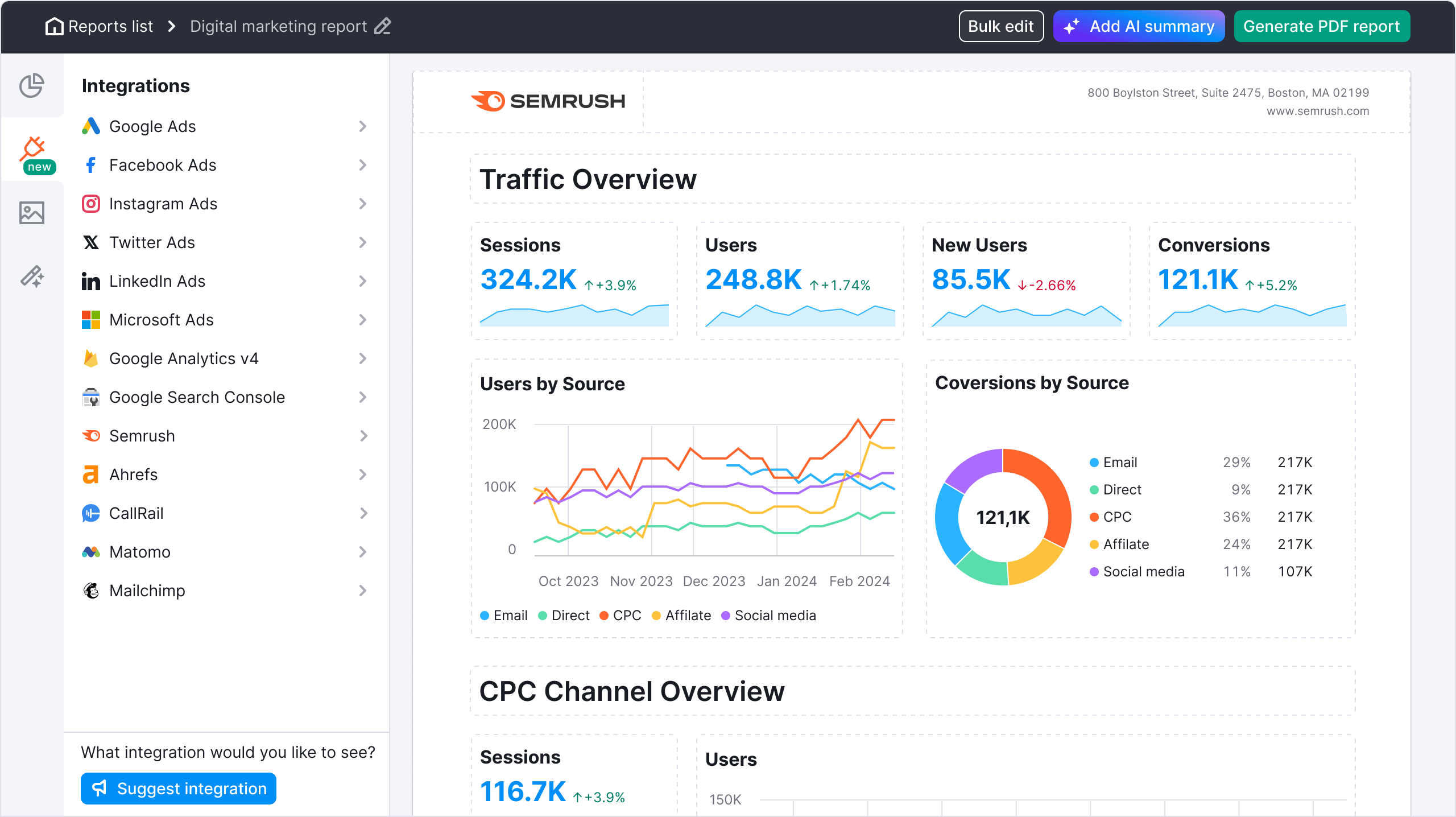
Best for: Teams that want an all-in-one SEO platform with built-in reporting
Semrush combines SEO reporting with keyword tracking, site audits, and competitive analysis in one platform. That means teams can build reports directly from existing data instead of pulling from multiple tools.
Its reporting features work well for both internal stakeholders and client-facing teams, with customizable dashboards and scheduled delivery.
Key features
- Custom report builder with scheduled delivery
- Position tracking across keywords, locations, and devices
- Site audit reports with prioritized issues
- AI visibility tracking across major platforms
- Combined traffic insights from GSC and GA4
Pros
- Covers reporting, research, and analysis in one platform
- Strong data across keywords, competitors, and backlinks
- Flexible reporting for different audiences
Cons
- Higher cost compared to point solutions
- Some reporting features gated behind higher-tier plans
- Takes time to fully learn and adopt
Pricing
Starts at $139.95/month
Who it’s best for: Teams that want one platform for research, reporting, and execution.
See how AirOps and Semrush stack up.
3. Ahrefs
Best for: SEO teams that rely heavily on backlink data and competitive analysis in reporting
Ahrefs is known for its backlink database, and that strength carries into its reporting capabilities. Teams use it to track domain authority, link growth, and competitor performance over time.
Its reporting tools focus less on visual dashboards and more on combining key SEO metrics into clear performance summaries.
Key features
- Report Builder for custom SEO reports
- Site Explorer for domain and competitor analysis
- Rank Tracker with visibility and position tracking
- Content Gap tool for identifying missed keyword opportunities
- Brand Radar for AI search visibility tracking
Pros
- Industry-leading backlink data
- Strong competitive analysis capabilities
- Clean, intuitive interface
- Reliable data for authority-based reporting
Cons
- No free plan
- AI visibility tracking is a paid add-on
- Limited reporting customization compared to dedicated reporting tools
- Fewer integrations than some competitors
Pricing
Starts at $129/month, with higher tiers unlocking more data and features.
Who it’s best for: Teams that build reporting around backlinks, domain authority, and competitive positioning.
See how AirOps and Ahrefs stack up.
4. SE Ranking
Best for: Agencies and teams that need full SEO reporting capabilities at a lower cost
SE Ranking offers a wide range of SEO features, including reporting, rank tracking, audits, and competitor analysis, at a more accessible price point.
Its reporting tools are especially useful for agencies. Teams can create white-label reports, automate delivery, and track multiple client projects without needing multiple tools.
Key features
- Rank Tracker with daily updates and SERP feature tracking
- Custom Report Builder with white-label options
- Website Audit with prioritized issues
- Competitive research tools
- AI search tracking across multiple platforms
- Integrations with Google Analytics and Search Console
Pros
- Strong value compared to higher-priced competitors
- Built-in white-label reporting at lower tiers
- Clean and easy-to-use interface
- Covers most core SEO reporting needs
Cons
- Smaller backlink database than Ahrefs or Semrush
- Some features require add-ons
- Limited scalability for very large teams
- AI tracking is less advanced than specialized tools
Pricing
Starts around $129/month, with higher tiers based on projects and keyword limits.
Who it’s best for: Agencies managing multiple clients who need solid reporting without enterprise-level pricing.
5. Whatagraph

Best for: Agencies that need to combine data from multiple tools into clean, client-ready reports
Whatagraph is a reporting platform first. It doesn’t collect SEO data on its own. Instead, it pulls data from tools like Semrush, Ahrefs, and Google Analytics and turns it into polished reports.
Its strength is presentation. Teams can create visually consistent reports, automate delivery, and standardize reporting across clients.
Key features
- Multi-source data integration across SEO and marketing tools
- Drag-and-drop report builder
- Automated report delivery
- AI-assisted report generation
- Custom branding and templates
- Data blending across multiple platforms
Pros
- Easy to use for non-technical users
- Strong visual reporting capabilities
- Supports multiple marketing channels
- Saves time on manual report creation
Cons
- No native SEO data or analysis
- Advanced integrations require higher-tier plans
- Limited flexibility in report layouts
- Costs can increase with more data sources
Pricing
Starts at €199/month, with higher tiers required for advanced integrations.
Who it’s best for: Agencies that already use SEO tools and need a way to present data clearly to clients.
6. Surfer SEO
Best for: Content teams that want to connect reporting insights to on-page optimization
Surfer SEO is not a reporting platform, but it often plays a role in reporting workflows because it connects performance data to content improvements.
Teams use it to analyze how pages perform and identify specific changes that can improve rankings, such as keyword usage, structure, and content depth.
Key features
- Content Editor with real-time scoring
- SERP Analyzer for ranking factor insights
- Content Audit for existing pages
- Keyword clustering and topical maps
- Google Docs and CMS integrations
Pros
- Strong on-page optimization guidance
- Easy for writers and content teams to use
- Integrates into content creation workflows
- Helps connect data to content updates
Cons
- Not a full reporting tool
- No backlink or technical SEO reporting
- Limited visibility into broader SEO performance
- Can lead to over-optimization if misused
Pricing
Starts at $79/month, with higher tiers for increased usage.
Who it’s best for: Content teams that need optimization insights alongside reporting tools.
See how AirOps and SurferSEO stack up.
7. Sitebulb
Best for: SEO teams that need to translate technical audits into clear reports for stakeholders
Sitebulb focuses on technical SEO reporting. It crawls websites, identifies issues, and presents findings in a way that non-technical stakeholders can understand.
Its reports are designed to bridge the gap between SEO specialists and leadership, making it easier to communicate technical problems and prioritize fixes.
Key features
- Website crawler with issue detection
- Prioritized “Hints” system for recommendations
- Custom PDF reports for different audiences
- Crawl maps for visualizing site structure
- Audit comparison over time
Pros
- Clear, actionable technical reporting
- Strong visualization of site structure and issues
- Affordable compared to enterprise crawlers
- Good for communicating technical SEO to stakeholders
Cons
- Desktop-based tool (resource intensive)
- No content or AI visibility tracking
- Limited integration with other SEO tools
- Not suited for full SEO reporting needs
Pricing
Starts at $18/month for Lite, with higher tiers for larger crawls and team collaboration.
Who it’s best for: Teams that need to explain technical SEO issues clearly and drive buy-in for fixes.
Common use cases for SEO reporting software
- Monthly client reporting for agencies: Automated reports pull data from multiple sources, apply consistent branding, and deliver updates on a set schedule. This helps teams show progress clearly while reducing time spent on repetitive reporting tasks.
- Executive communication and budget justification: SEO teams need to translate performance into something leadership can quickly understand. That means connecting metrics like rankings and traffic to outcomes like growth, pipeline, and ROI. Reporting tools help package this into clear summaries that support decision-making and budget conversations.
- AI search visibility monitoring: Visibility now extends beyond traditional search engines. Teams track how their brand appears in AI-generated answers across platforms like ChatGPT, Gemini, and Google AI Overviews. This includes monitoring citations, mentions, and overall presence.
- Content prioritization: SEO reporting helps teams decide what to work on next. Performance signals like traffic drops, declining rankings, or lost AI visibility highlight which pages need updates. This makes it easier to prioritize work across large content libraries.
- Technical monitoring: Technical issues can impact performance without clear visibility. Reporting tools track site health over time by flagging issues like crawl errors, broken links, and performance problems. This allows teams to catch and fix issues before they affect rankings.
- Competitive analysis: Teams use reporting to understand how they perform relative to competitors. Tracking rankings, content gaps, and visibility trends helps identify where competitors are gaining ground and where opportunities exist.
Reporting is no longer the finish line
SEO reporting has changed. Tracking rankings and traffic alone doesn’t give teams the full picture anymore. Visibility now spans search engines, AI platforms, and third-party sources, so reporting needs to reflect how content actually gets discovered.
The right tool depends on how your team works. Some teams need clearer dashboards. Others need better automation. More teams want a way to turn reporting into action without adding more manual work.
That’s the shift. Reporting is no longer something you review after the work is done. It’s how you decide what to do next.
AirOps is built around that idea. Instead of separating reporting from execution, it connects performance data, AI search visibility, and content updates in one place. Teams can identify opportunities, act on them, and track the impact without switching tools or rebuilding workflows. That leads to faster iteration, clearer priorities, and a more consistent way to improve performance over time.
Book a demo to see how AirOps helps teams turn SEO reporting into real content updates at scale.
FAQs
What is the best SEO reporting software for agencies?
It depends on your needs. Semrush offers a full all-in-one platform with reporting included. SE Ranking provides similar functionality at a lower cost. Whatagraph works well for visual reports across channels. AirOps stands out when agencies want to connect reporting directly to content execution.
Are free SEO reporting tools worth using?
Google Search Console and GA4 provide essential data at no cost. They’re a strong foundation. Free tiers from tools like AirOps or Semrush help evaluate platforms, but most teams outgrow them quickly.
How do SEO reporting tools work?
They connect to data sources like Google Search Console, analytics platforms, and rank trackers. They aggregate and visualize that data, then deliver reports through dashboards or scheduled exports.
Can AI automate SEO reporting?
AI can automate data collection, identify trends, and generate summaries. Some platforms go further by connecting those insights to content updates and execution.
Do I need SEO reporting software if I already use Ahrefs or Semrush?
You may not need a separate tool if your reporting needs are simple. Teams managing multiple clients, combining data sources, or tracking AI search visibility often need a dedicated solution.
Win AI Search.
Increase brand visibility across AI search and Google with the only platform taking you from insights to action.
Get the latest on AI content & marketing

Get the latest in growth and AI workflows delivered to your inbox each week