.avif)

Retrieval rank is the strongest predictor of whether a page gets cited in a ChatGPT answer.
A page at the top position in ChatGPT's web search results has a 58% chance of citation; by position 10, that drops to 14%. Among content signals, pages whose headings closely match the original query are cited more consistently than pages covering a broad set of fan-out subtopics. Moderate coverage of 2-3 subtopics outperforms exhaustive coverage when primary query relevance is held constant.
Domain authority and backlinks show no positive correlation with citation, and are slightly inversely correlated. The one exception is Wikipedia, which achieves the highest citation rate in the dataset (59%) through extreme content density (4,383 average words, 31 lists per page, 6.6 tables per page) despite the worst retrieval rank. For everyone else: be findable, match the query, structure your content well. Broad fan-out coverage is overrated.
Methodology
This study measures how well web pages cover the topics that ChatGPT searches for when answering user queries. We scraped ChatGPT’s UI for the data, not the API.
Scale: 16,851 unique queries across 10 categories (Publishing, E-commerce, Travel, Health, SaaS, Real Estate, Finance, Legal, Marketing, Business Services) and 4 query types (commercial, informational, transactional, local).
Process: Each query was sent to ChatGPT 3 separate times (runs 1, 2, and 3). For each run, the pipeline captured:
- The full ChatGPT response, parsed into answer sections
- Every fan-out query ChatGPT issued internally (sub-searches it used to gather information)
- Every URL returned by those fan-out searches (search results), and every URL cited in the answer (citations)
- The full HTML and extracted text of every page ChatGPT retrieved during answer generation for a user query (pages both retrieved, and those that were also cited)
Coverage Scoring: Each page's H1-H4 headings were embedded using BAAI/bge-base-en-v1.5 (768 dimensions), and cosine similarity was computed between query embeddings and heading embeddings. A page "covers" a query or fan-out subtopic when heading similarity exceeds a defined threshold (0.80 for the primary analysis; we also tested at 0.60 and 0.70, which produced the same pattern, see Finding 2).
Key numbers:
Fan-out behavior: 88.6% of queries generate exactly 2 fan-out sub-queries. Only 8.8% generate zero (typically simple product or entity queries), and 2.5% generate 4 or more (complex comparative or review queries).
Retrieval rank is the dominant signal
A page's position in ChatGPT's web search results is the single strongest predictor of citation. This held across every control we tested.

When ChatGPT answers a query, it issues web searches (fan-out queries) through its search tool and gets back a ranked list of URLs. Position 0 is the first result returned, position 1 is the second, and so on. The underlying search provider is not confirmed in the data; ChatGPT is publicly known to use Bing, but whether it also pulls from Google or other sources is unclear.
A page at rank 0 is 4x more likely to be cited than a page at rank 10.
Retrieval rank predicts citation consistency
Pages cited in all 3 runs (the most reliable sources) have dramatically better retrieval positions than pages never cited:
Rank matters even when content relevance is high
Among pages with headings that match the query (primary similarity >= 0.8), retrieval rank still drives a 58pp gap in citation rate:
A page with perfect content relevance at rank 11+ (21.5%) is still outperformed by a page with mediocre content at rank 0 (55.9% for primary sim < 0.60).
Implication: Retrievability is the first optimization target for ChatGPT citation. Content quality amplifies the signal, but without retrieval, there is nothing to amplify.
Key takeaways:
- Position in the retrieval system is the single strongest citation predictor, with a 4x gap between rank 0 (58%) and rank 10 (14%).
- Citation consistency tracks retrieval rank: pages cited in all 3 runs have a median rank of 2.5 vs 13.0 for never-cited pages.
- Even pages with strong heading matches (>= 0.8 similarity) drop from 80% to 22% citation rate as rank falls from 0 to 11+.
- A mediocre page at rank 0 (56% cite rate) outperforms a strong page at rank 6+ (26% cite rate). Rank overrides content quality.
Query match beats topical breadth
The strongest content signal is how well a page's headings match the original query. How many fan-out subtopics the page covers barely registers.
Methodology note: This analysis measures heading-level similarity only (H1-H4 text vs query embeddings). Full page body text was not vectorized against the query, so pages with strong body content but weak headings may be underrepresented in this signal. The heading-based approach captures structural relevance (what the page is organized around) rather than total textual overlap.
Primary similarity drives citation
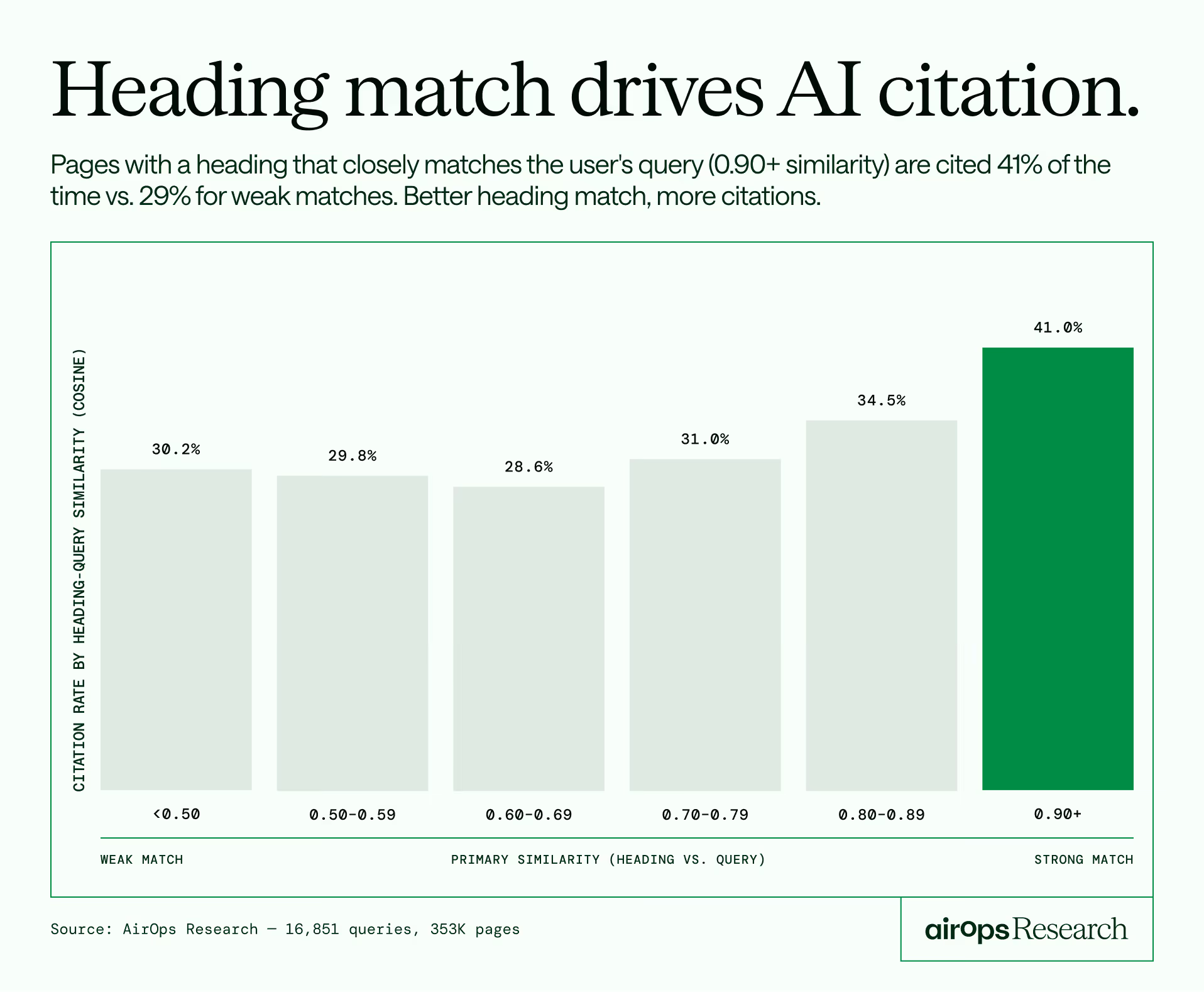
Primary similarity measures the cosine similarity between the query embedding and the best-matching heading on a page. The relationship with citation is clear and monotonic:
Even controlling for retrieval rank (only pages ranked 0-2), higher primary similarity adds +19pp to citation rate: from 55.9% at < 0.60 to 75.3% at 0.90+.
Fan-out coverage is a weak signal
Fan-out coverage ratio measures what share of the fan-out subtopics a page covers, scored against H2-H4 subheadings at a 0.80 cosine similarity threshold. We tested this at 0.60 and 0.70 as well; the pattern is identical at all thresholds (moderate coverage outperforms exhaustive coverage when query match is held constant).
Full fan-out coverage adds only +4.6pp over zero coverage. This gap is misleading: pages with high fan-out coverage also tend to have higher query match scores (0.834 vs 0.680), so the two signals travel together. The controlled test below isolates them and shows density adds little on its own.
The controlled test: moderate coverage beats exhaustive coverage
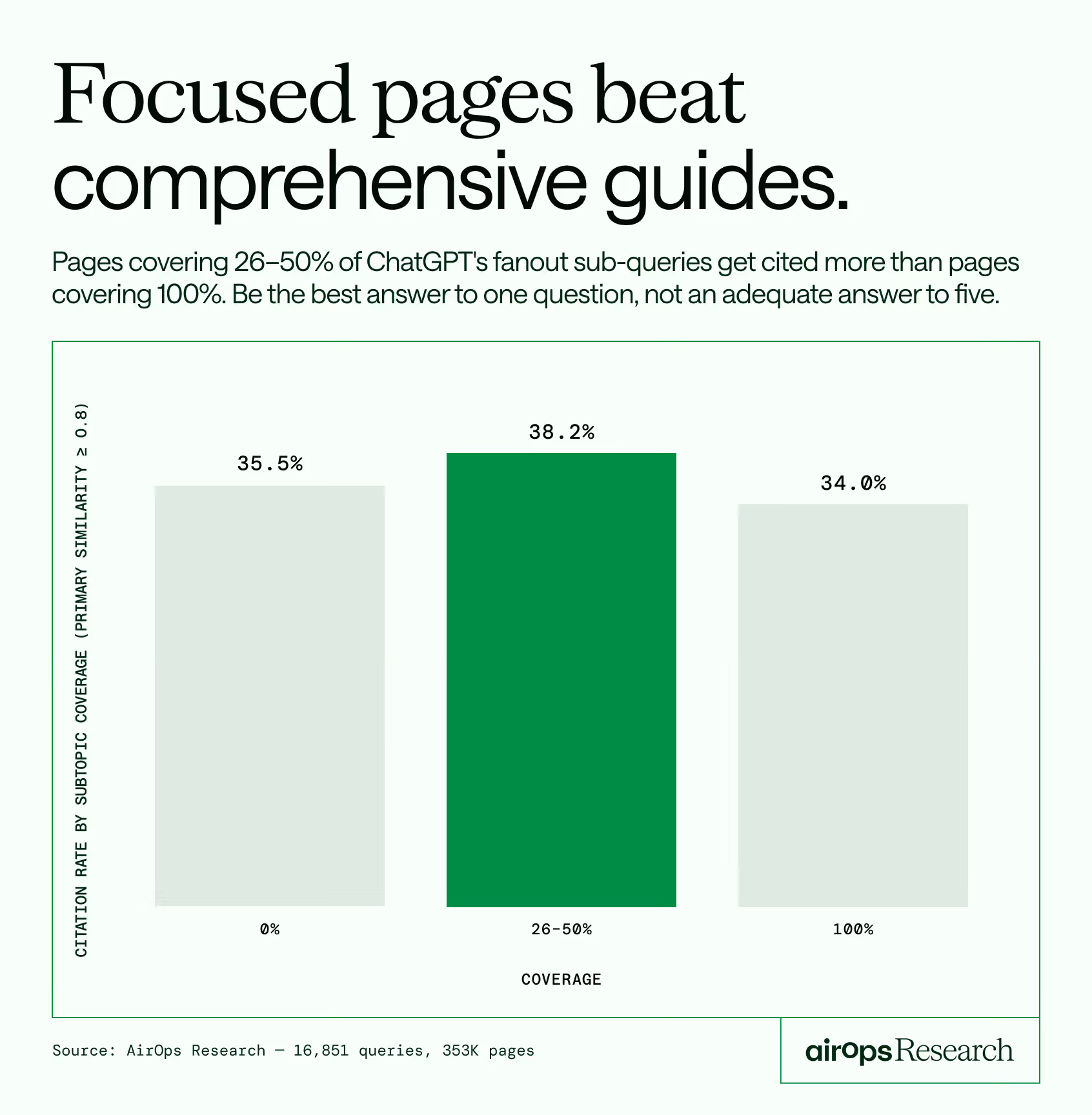
When we hold primary similarity constant (>= 0.8), the density advantage disappears and even reverses:
Pages covering 26-50% of fan-out subtopics outperform pages covering 100%. This suggests that exhaustive coverage may signal "generalist" content that addresses many topics without depth, while moderate coverage paired with strong primary relevance signals focused expertise.
Heading spread reinforces the pattern
We also measured how many distinct H2-H4 headings on a page match fan-out queries (at 0.70 threshold), controlling for primary similarity >= 0.8:
Matching 1 subheading performs identically to matching 0 (meaning the query-to-heading match alone is enough to drive citation, without any subtopic coverage). Matching 3-4 subheadings drops citation by 6pp. More heading matches do not help and may indicate diluted content.
Implication: Write content that directly answers the query you're targeting. A page that nails one question outperforms a page that adequately addresses five. The fan-out subtopics are not a content checklist.
Key takeaways:
Match the query directly in your primary heading, then use 4-10 subheadings to structure the answer, not to chase every related subtopic. Pages that match the query well get cited up to 41% of the time. Spreading across too many subtopics dilutes the signal and drops citation by 6pp.
- Query match (heading similarity to the original query) is the strongest content signal, scaling from 30% to 41% citation rate across similarity buckets.
- Even at top retrieval ranks, higher query match adds +19pp to citation rate.
- Fan-out coverage adds only +4.6pp uncontrolled, and the signal disappears when query match is held constant.
- Moderate subtopic coverage (26-50%) outperforms exhaustive coverage (100%) among pages with strong query match, at every threshold tested (0.60, 0.70, 0.80).
- Matching 3-4 distinct subheadings drops citation by 6pp vs matching 0-1. Breadth dilutes.
Content structure has a supporting role
Structural signals help at the margins but don't override retrieval rank or query relevance. The following analysis excludes low-content pages (word count < 100).
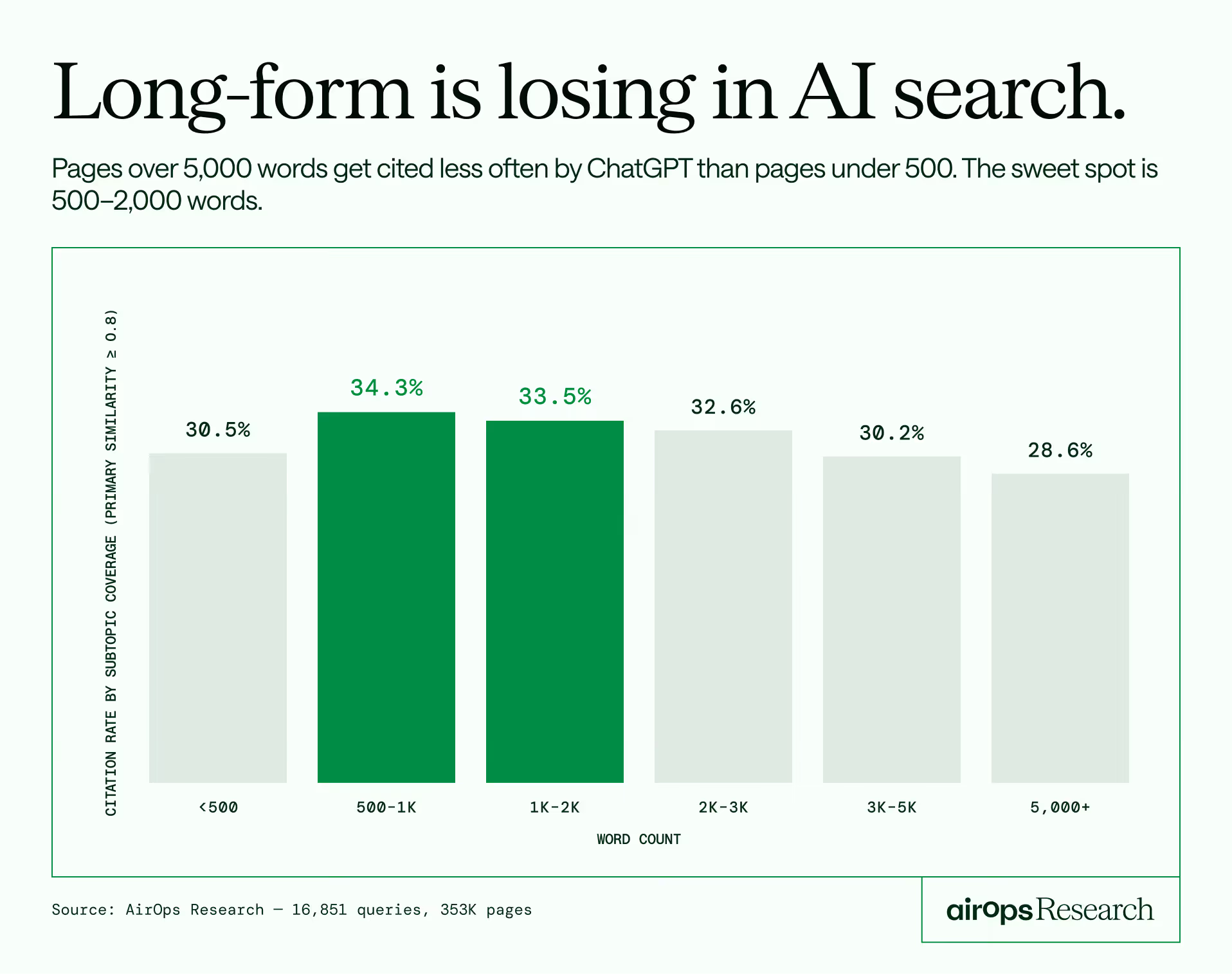
The sweet spot is 500-2,000 words. Pages over 5,000 words underperform pages under 500 words. Length works against you in ChatGPT citation.
Heading structure: 7-20 subheadings is optimal
Articles need enough structure to organize content but not so much that they become diluted. The 1-3 heading range (28.0%) performs worst, worse than zero headings (30.1%). This varies by page type:
For articles, the pattern is straightforward: more headings help up to a point, with 4-10 performing best (33.2%). For product pages, zero headings has the highest cite rate (43.2%), likely because product pages are already focused on a single item and don't need editorial structure. The "other" bucket (forums, homepages, landing pages) drives most of the zero-heading volume and shows the same 4-10 sweet spot as articles.
Schema markup: meaningful boost
Pages with JSON-LD schema markup have a +6.5pp citation advantage.
The top-performing schema types:
We checked whether JSON-LD pages differ on other signals that could explain the gap. They don't: JSON-LD pages have similar word counts (2,634 vs 2,627), similar heading counts (23.7 vs 23.0), similar DA (60.2 vs 59.4), and similar query match scores (0.745 vs 0.739). The schema markup boost appears to be an independent signal, possibly because structured data helps the retrieval system parse and categorize page content.

Lists and tables: modest signal
Pages with both lists and tables earn a +2.9pp advantage over pages with neither. Split by page type:
The list+table signal is strongest for product pages (+13pp vs neither). For articles, it barely matters. For the "other" bucket, the pattern tracks the overall average.
Readability: higher grade level performs better
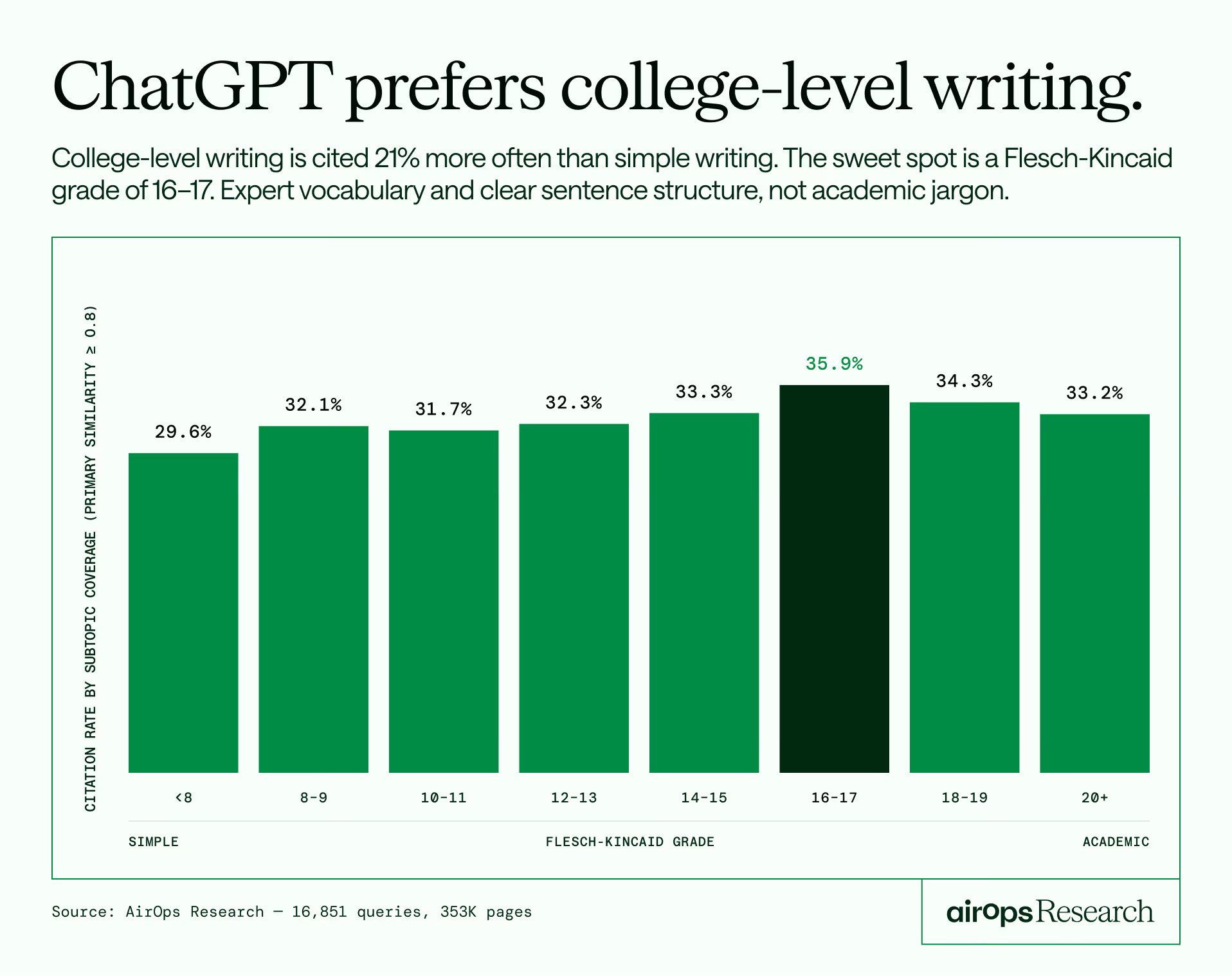
The FK 16-17 range performs best at 35.9%, consistent with prior AEO research that found FK 16 optimal for AI citation. The signal peaks at college-level writing and tapers above 18.
ChatGPT favors more sophisticated writing, peaking at college-level grade. This likely reflects that expert-written content tends to use higher-grade vocabulary and more complex sentence structure.
Implication: Structure your content with 7-20 subheadings, include lists and tables where appropriate, add JSON-LD schema markup, and write at FK grade 14-17. These are table stakes for AI visibility, not differentiators. None of these signals can overcome poor retrieval rank or weak query relevance.
Key takeaways:
- Word count sweet spot is 500-2,000 words. Pages over 5,000 words underperform pages under 500.
- 4-10 H2-H4 subheadings is the sweet spot for articles. Product pages perform best with zero headings.
- JSON-LD schema adds +6.5pp citation advantage independent of other content signals. FAQPage, MedicalWebPage, and BreadcrumbList lead.
- FK readability peaks at 16-17 (35.9%), confirming prior AEO research. College-level writing outperforms both simple and overly academic text.
- Lists + tables matter most for product pages (+13pp). For articles, the effect is negligible.
Authority signals don't predict citation
Traditional SEO authority metrics (domain authority, backlink count) show no positive correlation with citation rate in AI-generated answers.
Pages that are always cited have lower domain authority and fewer backlinks than pages that are never cited.
DA doesn't help at any similarity level
At every level of content relevance, the lowest DA quartile performs equal to or better than the highest.
High-authority platforms underperform
The five highest-DA site types in the dataset (YouTube 100, Wikipedia 95, Major News 94, Reddit 92, Health Publishers 90) produce citation rates ranging from 2.4% to 59.2%. Nearly identical authority, wildly different outcomes. DA tells you nothing about citation likelihood.
Implication: ChatGPT appears to evaluate content directly based on relevance, structure, and coverage. Domain authority carries no observable weight. Brands should evaluate their AEO strategy based on content quality, not link profiles.
Key takeaways:
- Always-cited pages have lower DA (53) than never-cited pages (56). Backlinks show a 3x inverse gap (1.1M vs 3.2M).
- At every level of query match, the lowest DA quartile performs equal to or better than the highest.
- The five highest-DA site types in the dataset (YouTube 100, Wikipedia 95, Major News 94, Reddit 92, Health Publishers 90) produce citation rates ranging from 2.4% to 59.2%. Nearly identical authority, wildly different outcomes. DA tells you nothing about citation likelihood.
- The signal that matters is content relevance at the page level, not domain-level authority.
Site type analysis
Citation rate, retrieval rank, and content profiles vary significantly by site type:
The Wikipedia exception
Wikipedia achieves the highest citation rate in the dataset (59.2%) despite having the worst retrieval rank (median 24.0, only 3.6% in the top 3) and the lowest primary similarity (0.576). It is the only site type where density clearly overcomes poor retrieval position.
What makes Wikipedia different is its content profile:
Wikipedia pages are longer, have more lists per page than any other site type, and have 8x the tables. They also have no JSON-LD schema and low domain authority. Wikipedia wins purely on content density: encyclopedic coverage, rich structured data within the content, exhaustive topic treatment.
No other site type replicates this pattern. This is not a scalable playbook for most sites.
Health publishers: the query match + rank model
Health publishers (Healthline, WebMD, Mayo Clinic, Cleveland Clinic, Verywell Health, Medical News Today) achieve the second-highest citation rate (46.4%) through a different strategy than Wikipedia. They have the best retrieval rank among all site types (median 7.0, 29.3% in top 3) combined with high primary similarity (0.734) and the highest fan-out coverage ratio (0.918).
Their content is focused (2,111 avg words), well-structured (17.2 H2-H4, 18.8 lists), and highly relevant to the queries they surface for. They also have the highest "mixed" rate (35.1% of their pages are sometimes-cited), reflecting intense competition across health queries.
Reddit: high authority, low value
Reddit has a DA of 92 but a citation rate of only 29.9% and the lowest citation consistency in the dataset (only 0.59% of Reddit pages are cited in all 3 runs). Reddit pages have almost no content structure (1.4 H2-H4 headings, 1.8 lists, 0 tables) and relatively short text (1,194 words).
There is no structural difference between always-cited and never-cited Reddit pages (1,111 vs 1,212 avg words, 1.0 vs 1.6 headings). For Reddit, citation depends entirely on whether the thread happens to contain the specific information ChatGPT is looking for.
Major news: surfaced often, cited inconsistently
Major news outlets (Forbes, NYT, The Guardian, BBC, CNN, Reuters, Washington Post) have the second-highest DA (94) but a below-average citation rate (32.0%) and high "mixed" rate (28.1%). They get surfaced across many queries but rarely own a topic.
Within major news, always-cited pages have significantly more structure than never-cited pages (28.4 vs 20.4 H2-H4 headings, 2,904 vs 2,268 words). This is one of the few site types where content structure meaningfully separates winners from losers.
Government: focused beats exhaustive
Government pages (.gov) show an unexpected within-type pattern. Never-cited government pages are longer (6,292 vs 4,091 avg words) and have more headings (26.3 vs 21.4) than always-cited government pages. For government content, shorter and more focused outperforms longer and broader.
Government pages do show a citation boost beyond what content signals explain. Controlling for query match level:
At high query match, government pages get cited 49% of the time vs 35% for non-government pages. The gap widens as content relevance increases, suggesting ChatGPT may apply a source-trust signal for .gov domains.
YouTube and marketplaces: structurally disadvantaged
YouTube (2.4% citation rate) and marketplace pages are structurally disadvantaged. YouTube pages have minimal extractable text (600 avg words), and marketplace pages, despite having rich content (3,349 words, 40.4 H2-H4 headings), serve product listing formats that don't align well with informational queries.
Amazon does skew the marketplace numbers down. Per-marketplace breakdown:
Amazon's 12% rate (likely affected by bot-blocking) pulls down the group average. Target and Etsy perform closer to the overall dataset average, suggesting the marketplace format itself is the primary constraint, with Amazon's crawl restrictions adding a secondary penalty.
Key takeaways:
- Wikipedia wins through density alone (59% cite rate) despite worst retrieval rank (median 24) and lowest query match (0.576). No other site type shows this pattern.
- Health publishers win through the opposite strategy: best retrieval rank (median 7), strong query match (0.734), focused content (2,111 words).
- Government pages get a citation boost beyond content signals (+14pp at high query match), suggesting a source-trust factor.
- Reddit's DA 92 produces 0.59% consistency (cited all 3 runs). Authority without structure is unreliable.
- Amazon's bot-blocking drops its cite rate to 12%, pulling down marketplace averages.
The bimodal reality of citation
The citation distribution is bimodal, meaning pages tend to either get cited by ChatGPT or not. There is little middle ground.
58% of pages are never cited in any query they appear for. 25% are cited every time they appear in ChatGPT’s web search. Only 17% fall in between.
On-page signals don't explain the split
The profiles are nearly identical. Word count, headings, readability, lists, tables, and domain authority do not differentiate always-cited pages from never-cited pages. The differentiator, as established in Finding 1, is retrieval position.
The "mixed" pages tell a story
The 17% of pages that are sometimes-cited have a distinct profile:
Mixed pages appear across the most queries (median 3, up to 372x for a single page), have the longest content, the most headings, and the highest domain authority. These are broad, authoritative resources that get surfaced often but don't reliably win. They represent the "cover everything, earn links, hope to be cited" strategy. The data suggests this approach produces inconsistent results.
By page type, 80% of mixed pages are classified as "other" and 19% as articles. Breaking the "other" bucket down further:
The top domains among mixed pages: Reddit (1,582), Wikipedia (965), Alibaba (572), Forbes (537), Vogue (512), TechRadar (509), Healthline (505), Tom's Guide (434), Consumer Reports (400). These are editorial, review, and lifestyle publishers that cover many topics broadly. Mixed citation is a byproduct of breadth-first content strategies across verticals.
The bimodal split by site type
Wikipedia has the most favorable distribution: 55% of its pages are always-cited. Health publishers have the highest "mixed" rate (35.1%), reflecting competitive health query space. Major news also has high "mixed" (28.1%), consistent with pages that cover many topics but rarely dominate.
Implication: Consistent AI citation comes from being the retrievable, well-matched answer to a specific query. Broad coverage strategies produce "mixed" results at best. The highest-performing pages are narrowly focused resources that surface for few queries and win every time they appear.
Key takeaways:
- The citation distribution is bimodal: 58% of pages are never cited, 25% are always cited. Only 17% are in between.
- On-page signals (word count, headings, readability, DA) are nearly identical between always-cited and never-cited pages. Retrieval position is the separator.
- "Mixed" pages have the longest content, the most headings, and the highest DA. They are the "ultimate guides" and they perform the least reliably.
- Mixed pages are broadly distributed across verticals, not concentrated in one site type.
- Wikipedia has the most favorable split: 55% always-cited. Marketplaces have the worst: 81% never-cited.
Citations are front-loaded and follow retrieval rank
ChatGPT's answers cite 5-7 sources on average. Those citations are concentrated in the first third of the answer and follow the retrieval rank order.
Citation distribution across the answer
41% of all citations appear in the opening section of the answer. The last third accounts for only 25%.
Search rank predicts citation position
Pages that rank higher in ChatGPT's web search get cited earlier in the answer:
Pages ranked 0-2 are cited at position 2.2 on average. Pages ranked 11+ appear at position 6.2. Pages cited "from memory" (not found in any search result) appear early too (position 3.3), suggesting ChatGPT treats its training-data references as high-confidence sources.
Density doesn't earn repeat citation
Each cited page appears exactly one time per response regardless of fan-out coverage. Pages with 100% subtopic coverage get cited once, same as pages with 0%. Density does not earn a page multiple citations within a single answer.
Key takeaways:
- 41% of citations land in the first third of the answer. Early position correlates with search rank.
- Search rank 0-2 pages are cited at position 2 on average. Rank 11+ pages are cited at position 6.
- Pages cited from ChatGPT's training data (without appearing in search results) are treated as high-confidence, appearing at position 3.3 on average.
- No page gets cited more than once per response, regardless of density.
Freshness matters, but only with relevance
41% of pages in the dataset have a detectable publish date. Among those, page age shows a clear relationship with citation.
Page age vs citation rate
The sweet spot is 30-89 days old (32.8%). Very fresh content (< 30 days) underperforms at 25.3%, possibly because brand-new pages haven't been fully indexed or established retrieval signals yet. Pages older than 2 years decline to ~27.5%.
.avif)
Freshness by industry
41% of pages in the dataset have a detectable publish date. Among those, page age shows a clear relationship with citation.
The sweet spot is 30-89 days old (32.8%). Very fresh content (< 30 days) underperforms at 25.3%, possibly because brand-new pages haven't been fully indexed or established retrieval signals yet. Pages older than 2 years decline to ~27.5%.
Key patterns by vertical:
- Finance has the strongest freshness signal: 50.2% at 30-89 days, dropping to 35.1% at 5+ years (15pp gap). Makes sense for a category where rates, regulations, and products change frequently.
- SaaS peaks at 30-89 days (39.3%) and declines steadily to 28.5% at 5+ years (11pp gap). Software content ages fast.
- Travel shows a sharp freshness curve: 44.8% at 30-89 days, down to 26.2% at 5+ years (19pp gap, the largest in the dataset).
- E-commerce is the exception: freshness barely matters. The 5+ year bucket (36.7%) performs nearly as well as 30-89 days (35.9%). Evergreen product content holds up.
- Health is unusual: 1-2 year old content (32.3%) slightly outperforms fresh content (25.6-29.9%). Established medical content may carry more trust.
Freshness matters most when content is relevant
Controlling for query match level:
Among pages with strong query match, fresher pages have a +4.2pp advantage (35.4% vs 31.2%). Among pages with weak query match, the age effect is negligible or slightly reversed. Freshness amplifies content relevance; it does not substitute for it.
Key takeaways:
- The citation sweet spot is 30-89 days old (32.8%). Very fresh (< 30 days) underperforms, possibly due to incomplete indexing.
- Pages older than 2 years see a 5pp drop in citation rate.
- Freshness matters most when query match is already strong (+4.2pp). With weak query match, age barely matters.
ChatGPT cites from memory, and those pages look like everything else
6,371 page-query combinations in the dataset were cited by ChatGPT without the page appearing in any search result for that query. These are pages ChatGPT referenced from its training data.
What gets cited from memory?
Reddit is the largest identifiable source of memory citations (11.1%), followed by health publishers and news. The majority (79.5%) come from miscellaneous domains. Top individual domains: Reddit (190 pages), Wikipedia (37), Forbes (32), Healthline (25), Tom's Hardware (22).
Memory-cited pages look identical to search-cited pages
The content profiles are nearly identical. Memory-cited pages have marginally higher DA (59.1 vs 58.0) and slightly shorter word count, but the differences are trivial. ChatGPT does not appear to apply a different quality bar for memory citations vs search-surfaced citations.
Key takeaways:
- 6,371 citations come from ChatGPT's training data, not from search results.
- Reddit accounts for 11% of memory citations, the largest identifiable source.
- Memory-cited pages have the same content profile as search-cited pages: similar word count, headings, DA, and query match.
- Memory citations appear at position 3.3 in the answer on average, earlier than most search-surfaced citations.
Implications for your AI visibility strategy
1. Retrievability first
If ChatGPT can't find your page in its web search results, nothing else matters. Rank position is the strongest citation predictor (58% at position 0 vs 14% at position 10). Optimization for AEO starts with being discoverable by the retrieval system.
2. Query match over breadth
Match the query directly in your headings. A focused 800-word page outperforms a 5,000-word guide. When primary query relevance is high, moderate subtopic coverage (26-50%) outperforms exhaustive coverage (100%). Write content that is the best answer to one specific question.
3. Structure supports, doesn't save
Use 4-10 H2-H4 subheadings for articles (the optimal range varies by page type; product pages perform best with fewer or no subheadings). Include lists and tables where appropriate (especially for product pages, where the effect is strongest). Add JSON-LD schema markup (especially FAQPage, Article, or MedicalWebPage). Write at a professional grade level. Structural signals add 2-6pp to citation rates but cannot overcome poor retrieval or weak relevance.
4. Rethink authority as a proxy
Domain authority and backlink volume don't translate to AI citation. The lowest DA quartile performs as well as the highest at every relevance level. Evaluate your AEO strategy on content merit, not link profiles.
5. The Wikipedia playbook only works at Wikipedia scale
Wikipedia-level density is a real signal, but it requires encyclopedic coverage: 4,000+ words, dozens of lists, multiple tables, exhaustive topic treatment. No other site type replicates this pattern. For most publishers, the better strategy is to be the well-matched, well-structured, findable answer to a specific query.
6. Freshness is a lever to pull
Pages aged 30-89 days hit the highest citation rate (32.8%). Very fresh content (< 30 days) underperforms at 25.3%, likely because new pages haven't built retrieval signals yet. Pages older than 2 years drop to 27.5%. The freshness effect is strongest when query match is already high (+4.2pp for pages under 1 year vs 1-5 years). For publishers with relevant content aging past 2 years, refreshing is a 5pp lift waiting to be captured.
Methodology notes and caveats
Scope: This study measures ChatGPT's search and citation behavior specifically. ChatGPT and Google AI Mode use a similar fan-out query pattern (expanding a single query into multiple sub-queries), but they use different retrieval systems. Content signal findings (query match, density, structure) may transfer to other AI answer engines. Retrieval rank findings are specific to ChatGPT's search system.
Similarity thresholds: The default 0.5 cosine similarity threshold used in the pre-computed fan-out_coverage_ratio column creates a ceiling effect (P25 = median = P75 = 1.0). All density analysis in this report uses stricter thresholds (0.70 and 0.80) applied to H2-H4 subheading matches via the coverage_fan-out_detail table.
H1 vs H2-H4: Primary similarity matches against all headings (H1-H4). Since H1 is typically the page title and tends to match broadly, the fan-out coverage analysis uses H2-H4 only (h234_heading_sim) to measure whether the article's content subheadings address the subtopics.
Data exclusions: 806 queries have no coverage data (cited/seen URLs had no fetchable HTML). 35,020 pages (10%) flagged as is_low_content (word count < 100) were excluded from content quality analysis. These are primarily paywalled articles, Facebook posts, and JS-rendered tool pages.
Embedding model: All similarity scores use BAAI/bge-base-en-v1.5 (768 dimensions). Scores are directly comparable across all queries and pages.
Consistency measurement: Each query was sent to ChatGPT 3 times. Citation consistency (total_runs_cited) measures how many of the 3 runs cited a given page for a given query. Only 2.3% of page-query combinations are cited in all 3 runs, making consistent citation the most stringent quality bar in the dataset.